# Gurubase Siper Dokümantasyonu
> Türkçe kişisel veri maskeleme ve AI gateway: dakikalar içinde ilk istek, API referansı, güvenlik.
# Gurubase Siper Dokümantasyonu
Source: https://siper.gurubase.ai/docs/
Gurubase Siper üç parçadan oluşur: OpenAI uyumlu bir AI gateway, Türkçe metin için
kişisel veri maskeleme ve bir yönetim paneli. İstekler, dış dil modeline gitmeden
önce Türkiye'de maskelenir. Kişisel veri içeren metinlerle çalışan ve bu veriyi
olduğu gibi yurt dışındaki modellere göndermek istemeyen ekipler için tasarlandı.
Maskeleme pratikte şöyle görünür:
## Buradan başlayın
Sanal anahtarınızı alın, OpenAI SDK ile ilk isteğinizi gönderin.
Maskeleme nasıl çalışır, yer tutucu formatı, fail-closed davranış ve veri egemenliği.
Maskelenen 26 kişisel veri kategorisi, sentetik örnekleriyle.
OpenAI SDK ile geçiş, streaming ve yalnız maskeleme.
Gateway ve maskeleme uç noktalarının tam referansı.
Veri saklama yaklaşımı, denetim izi ve erişim kontrolleri.
Hesap oluşturmak için [bizimle iletişime geçin](https://siper.gurubase.ai/iletisim);
hesabınız hazırsa [panele](https://gateway-tr.gurubase.io) giriş yapıp sanal
anahtarınızı üretebilirsiniz.
Siper, [Gurubase](https://gurubase.io) ürün ailesindendir. Gurubase, kurumun
kendi bilgi kaynaklarından beslenen, her yanıtında kaynak gösteren ve bağlam
zayıfsa yanıtlamayı reddeden AI ajanları kurmanızı sağlar; Siper ise bu
ailenin Türkçe kişisel veri koruması katmanıdır.
## AI ajanları için
Bu dokümanlar makine-okunur biçimde de sunulur; AI ajanları ve LLM'ler doğrudan tüketebilir:
- [llms.txt](/docs/llms.txt): sayfa dizini ve özetler
- [llms-full.txt](/docs/llms-full.txt): tüm dokümanların tam metni tek dosyada
- Her sayfanın ham Markdown hali: URL sonuna `.md` ekleyin (ör. [getting-started.md](/docs/getting-started.md))
Bu dosyalar her build'de otomatik üretilir ve içerikle güncel kalır.
---
# Gurubase Gateway API
Source: https://siper.gurubase.ai/docs/api/gateway/
Gurubase Gateway, **OpenAI Chat Completions** ile birebir uyumlu bir AI
gateway'idir. Mevcut OpenAI SDK'nızda yalnızca `base_url` ve API anahtarını
(sanal anahtar) değiştirerek geçiş yaparsınız; kod değişikliği gerekmez.
Her istek arka uçtaki dil modeline (örn. Azure OpenAI) iletilmeden **önce**,
metindeki kişisel veriler Gurubase Siper ile Türkiye'de maskelenir; modele
yalnızca maskeli içerik gider. Yanıt geri akar.
> **Kimlik doğrulama:** Tüm istekler `Authorization: Bearer `
> başlığı ile gönderilir. Sanal anahtar admin panelden üretilir; gerçek
> sağlayıcı (Azure) anahtarı yalnızca gateway içinde tutulur, istemciye inmez.
## Chat
OpenAI uyumlu Chat Completions uç noktaları
## Responses
OpenAI-uyumlu Responses API uç noktası
## Models
Erişilebilir modellerin listesi
---
# Chat Completions (OpenAI uyumlu)
Source: https://siper.gurubase.ai/docs/api/gateway/chat/createchatcompletion/
OpenAI `POST /v1/chat/completions` ile uyumlu. İstek gövdesindeki
`messages` içeriği, model çağrılmadan önce PII açısından maskelenir.
`stream: true` ile SSE streaming desteklenir.
---
# Erişilebilir modelleri listele
Source: https://siper.gurubase.ai/docs/api/gateway/models/listmodels/
Sanal anahtarın erişebildiği modellerin OpenAI-uyumlu listesi.
---
# Responses API (OpenAI uyumlu)
Source: https://siper.gurubase.ai/docs/api/gateway/responses/createresponse/
OpenAI `POST /v1/responses` ile uyumlu. `input` alanı string ya da mesaj
dizisi olabilir; her iki biçimde de model çağrılmadan önce PII açısından
maskelenir. Maskeleme **fail-closed**'dur (maskelenemezse istek modele
gitmeden durur).
---
# Gurubase Siper API
Source: https://siper.gurubase.ai/docs/api/siper/
Metindeki kişisel verileri tespit eder ve seçilen dönüşüme göre maskeler.
Gateway entegrasyonunda Siper, dil modeline gitmeden önce metni maskeler;
bağımsız olarak da `/mask` ve `/mask/batch` uçlarıyla doğrudan kullanılabilir.
> **Kimlik doğrulama:** Panelden ürettiğiniz sanal anahtar
> `Authorization: Bearer ` başlığında gönderilir.
> Kurum içi (on-premise) kurulumda da mimari aynıdır: Gateway ve panel
> kurulumla birlikte gelir, istekler yine sanal anahtarla yetkilendirilir.
## Maskeleme
Tekil ve toplu maskeleme uç noktaları
---
# Metni maskele
Source: https://siper.gurubase.ai/docs/api/siper/maskeleme/mask/
Verilen metindeki kişisel verileri tespit eder ve seçilen dönüşüme göre
maskeler. Varsayılan dönüşüm `placeholder` (geri-çözülebilir yer-tutucu).
---
# Toplu maskele
Source: https://siper.gurubase.ai/docs/api/siper/maskeleme/maskbatch/
Birden çok metni tek istekte maskeler. Yanıt, girdi sırasıyla eşlenir.
Uzunluk sınırı, birleştirilmiş toplam metin üzerinden uygulanır.
---
# Maskelenen kategoriler
Source: https://siper.gurubase.ai/docs/categories/
Siper, Türkçe metinde 26 kişisel veri kategorisi tespit eder ve maskeler. Bu
sayfa tam listedir: her kategorinin yanında kısa bir açıklama ve sentetik bir
örnek var. Dokuz kategori KVKK'nın 6. maddesindeki özel nitelikli kişisel veri
tanımına girer; onları ayrı bölümde bulursunuz.
Örneklerin tamamı sentetiktir, gerçek bir kişiye ait değildir. Maskeli çıktıda
her kategorinin kendi yer tutucusu vardır; API bunları İngilizce adlarıyla
döndürür. Biçimin ayrıntısı için [Kavramlar](/concepts).
## Genel kategoriler
| Kategori | Açıklama | Sentetik örnek |
| --- | --- | --- |
| | Ad ve soyadı. | `Ahmet Yılmaz` |
| | Sokak, mahalle ve açık adres bilgisi. | `Zambak Sk. No:4` |
| | Gün, ay ve yıl içeren doğum tarihi. | `12.03.1981` |
| | T.C. kimlik numarası. | `10000000214` |
| | Yabancı kimlik numarası; 99 ile başlar. | `99…` |
| | Vergi kimlik numarası. | vergi no |
| | Şirketlerin Merkezi Sicil Kayıt Sistemi numarası. | MERSİS no |
| | Sosyal Güvenlik Kurumu sicil numarası. | SGK sicil |
| | Pasaport numarası. | `U1234…` |
| | Kimlik kartı seri numarası. | kimlik seri |
| | Cep telefonu numarası. | `0532 000 11 22` |
| | Sabit hat numarası. | `0212…` |
| | E-posta adresi. | `ayse.demir@ornek.gov.tr` |
| | Banka hesap numarası. | `TR33…` |
| | Ödeme kartı numarası. | `4111…` |
| | Araç plakası. | `35 ABC 042` |
| | IP adresi. | `10.1.2.3` |
## Özel nitelikli kategoriler (KVKK m.6)
Aşağıdaki dokuz kategori 6698 sayılı Kanunun 6. maddesi kapsamındadır.
Kategorinin adı tek başına kişisel veri değildir; "sendika üyeliği" kavramını
anmak ile bir kişinin sendika üyeliğini yazmak farklı şeylerdir. Bu yüzden
tablodaki her örnek bir cümledir ve ters tırnaklı bölüm, Siper'in o cümlede
maskelediği ifadedir. Örneklerin tamamı sentetiktir ve canlı serviste
doğrulanmıştır; gerçek bir inanç, köken, parti veya kuruluş adı geçmez.
| Kategori | Açıklama | Örnek cümle ve maskelenen bölüm |
| --- | --- | --- |
| | Kişiye bağlı tanı, tedavi ve sağlık durumu. | Ayşe Demir'e `diyabet tanısı` kondu. |
| | Kişinin dini inancına dair ifadeler. | Çalışan, `dini inancı` gerekçesiyle izin talep etti. |
| | Kişinin etnik kökenine dair ifadeler. | Tanık, `etnik kökenine` yönelik ayrımcılığa uğradığını belirtti. |
| | Kişinin siyasi görüşü ve parti üyeliği. | Başvuran, `Y Partisi üyeliğini` doğruladı. |
| | Kişinin sendika üyeliği. | Ahmet Yılmaz, `Örnek-İş Sendikası` üyesidir. |
| | Kişinin mahkûmiyet ve güvenlik tedbiri bilgisi. | Müşteri, `adli sicil kaydı` bulunmadığını beyan etti. |
| | Kişinin cinsel hayatına dair ifadeler. | Danışan, `cinsel yönelimini` görüşmede paylaştı. |
| | Biyometrik şablon ve kayıt kodları; kod yalnız biyometrik bağlam yakınındaysa maskelenir. | Parmak izi şablonu `FP-7788` sistemde kayıtlı. |
| | Kişiye bağlı gen ve varyant adları; ad yalnız genetik bağlam içinde maskelenir. | `BRCA1` mutasyonu taşıdığı genetik testle doğrulandı. |
Siper bu kategorilerde temkinli davranır: "diyabet tanısı" gibi bir ifade,
cümlede açık bir kişiye bağlanmasa da maskelenebilir. Tercih bilinçlidir;
kişisel veriyi kaçırma riski, genel bir ifadeyi fazladan maskeleme
maliyetinden ağır basar. Kurumunuza özgü, kişisel veri taşımadığından emin
olduğunuz kalıpları maskeleme dışında tutmak için `allow_patterns` alanını
kullanabilirsiniz ([Yalnız maskeleme → Desen listeleri](/guides/mask-only#desen-listeleri)).
Kapsamı daraltmak isterseniz `/mask` isteğinde hazır kategori kümeleri var;
örneğin `KVKK_SENSITIVE` yalnız bu dokuz kategoriyi maskeler. Ayrıntı:
[Yalnız maskeleme → Kategori filtreleme](/guides/mask-only#kategori-filtreleme).
Kategorileri kendi metninizde denemek için [Playground](/guides/playground).
---
# Kavramlar
Source: https://siper.gurubase.ai/docs/concepts/
Siper, dil modeline giden her isteği önce maskeleme adımından geçirir. Bu
sayfa o adımda ne olduğunu anlatır: yer tutucuların biçimi, maskeleme yapılamadığında
Gateway'in davranışı ve verinizin nerede işlendiği.
## Maskeleme nasıl çalışır?
Gateway'e gelen metin, modele iletilmeden önce taranır. Tespit edilen her
kişisel veri `` biçiminde bir yer tutucuyla değiştirilir: metindeki
ilk kişi adı `` olur, ikincisi ``. Model yalnız maskeli
metni görür; yanıt dönerken yer tutucular korunur.
Ad, TCKN, telefon ve adres dahil 26 kategori tespit edilir. Tam liste ve
sentetik örnekler için [Kategoriler](/categories).
Bu doğruluğun arkasında veri var: KVKK'nın özel nitelikli kategorilerini
(sağlık, din, siyasi görüş, sendika üyeliği ve ceza mahkûmiyeti dahil) kapsayan,
Türkçeye özgü büyük bir eğitim veri setini kendimiz oluşturduk ve modeli bu
setle aylar süren bir çalışmayla eğittik. Yeni sürümleri aynı test
protokolüyle yeniden ölçer, karşılaştırmalı sonuçları
[benchmark sayfasında](https://siper.gurubase.ai/benchmark) paylaşırız.
## Yer tutucu formatı ve dil ayrımı
API'den dönen maskeli metinde yer tutucular İngilizcedir: ``,
``, ``. Aynı kategorideki her yeni değer numarayı bir
artırır. Yönetim paneli ise aynı yer tutucuları Türkçe etiketlerle gösterir; bu
yalnız gösterim katmanıdır, API sözleşmesi değişmez.
| API çıktısı | Panel gösterimi |
| ------------------ | --------------- |
| `` | `` |
| `` | `` |
| `` | `` |
Entegrasyon kodu yazarken her zaman İngilizce biçimi esas alın; Türkçe
etiketler yalnız panelde görünür.
## Maskeleme yapılamazsa ne olur?
İstek durur. Maskeleme hizmeti bir isteği işleyemezse Gateway o isteği dış
modele iletmez ve 502 durum koduyla yanıtlar; "maskesiz de olsa gönder" diye
bir seçenek yoktur. 502 aldığınızda isteği daha sonra yeniden deneyin. Bu
davranışın adı fail-closed.
## Veri egemenliği
Maskeleme, model çağrısından önce, Türkiye'de barındırılan altyapıda çalışır.
Dış dil modeline yalnız maskeli metin gider; ham kişisel veri yurt dışına
çıkmaz.
Saklama, denetim izi ve erişim konuları için [Güvenlik](/security).
---
# Introduction
Source: https://siper.gurubase.ai/docs/en/
Gurubase Siper consists of three parts: an OpenAI-compatible AI gateway,
personal data masking for Turkish text, and a management panel. Requests are
masked in Turkey before they go to the external language model. It is designed
for teams that work with text containing personal data and do not want to send
that data as-is to models abroad.
In practice, masking looks like this:
## Start here
Get your virtual key and send your first request with the OpenAI SDK.
How masking works, the placeholder format, fail-closed behavior, and data sovereignty.
The 26 masked personal data categories, with synthetic examples.
Switching with the OpenAI SDK, streaming, and mask-only usage.
Full reference for the Gateway and masking endpoints.
Data retention approach, audit trail, and access controls.
To create an account, [contact us](https://siper.gurubase.ai/iletisim);
if your account is ready, you can sign in to the
[panel](https://gateway-tr.gurubase.io) and generate your virtual key.
Siper is part of the [Gurubase](https://gurubase.io) product family. Gurubase
lets you build AI agents that draw on your organization's own knowledge
sources, cite a source in every answer, and decline to answer when the context
is weak; Siper is the family's Turkish personal data protection layer.
## For AI agents
These docs are also available in machine-readable form for AI agents and LLMs:
- [llms.txt](/docs/llms.txt): a page index with summaries
- [llms-full.txt](/docs/llms-full.txt): the full text of every page in one file
- Each page's raw Markdown: append `.md` to its URL (for example [getting-started.md](/docs/en/getting-started.md))
These files are generated automatically on every build and stay in sync with the content.
---
# Gurubase Gateway API
Source: https://siper.gurubase.ai/docs/en/api/gateway/
Gurubase Gateway is an AI gateway fully compatible with **OpenAI Chat
Completions**. You switch by changing only the `base_url` and the API key
(virtual key) in your existing OpenAI SDK; no code changes are required.
**Before** each request is forwarded to the backend language model (e.g.
Azure OpenAI), personal data in the text is masked in Türkiye with Gurubase
Siper; only the masked content reaches the model. The response flows back.
> **Authentication:** All requests are sent with the
> `Authorization: Bearer ` header. The virtual key is
> generated in the admin panel; the real provider (Azure) key is kept only
> inside the gateway and is never sent down to the client.
## Chat
OpenAI-compatible Chat Completions endpoints
## Responses
OpenAI-compatible Responses API endpoint
## Models
List of accessible models
---
# Chat Completions (OpenAI compatible)
Source: https://siper.gurubase.ai/docs/en/api/gateway/chat/createchatcompletion/
Compatible with OpenAI `POST /v1/chat/completions`. The `messages`
content in the request body is masked for PII before the model is
called. SSE streaming is supported with `stream: true`.
---
# List accessible models
Source: https://siper.gurubase.ai/docs/en/api/gateway/models/listmodels/
OpenAI-compatible list of the models the virtual key can access.
---
# Responses API (OpenAI compatible)
Source: https://siper.gurubase.ai/docs/en/api/gateway/responses/createresponse/
Compatible with OpenAI `POST /v1/responses`. The `input` field can be a
string or an array of messages; in both forms the content is masked for
PII before the model is called. Masking is **fail-closed** (if the text
cannot be masked, the request stops before reaching the model).
---
# Gurubase Siper API
Source: https://siper.gurubase.ai/docs/en/api/siper/
Detects personal data in text and masks it according to the selected transform.
In the gateway integration, Siper masks the text before it reaches the
language model; it can also be used directly and on its own through the
`/mask` and `/mask/batch` endpoints.
> **Authentication:** the virtual key you generate in the panel is sent in
> the `Authorization: Bearer ` header. The architecture is the
> same in an on-premise installation: the Gateway and the panel ship with
> the setup, and requests are still authorized with a virtual key.
## Maskeleme
Single and batch masking endpoints
---
# Mask text
Source: https://siper.gurubase.ai/docs/en/api/siper/maskeleme/mask/
Detects personal data in the given text and masks it according to the
selected transform. The default transform is `placeholder` (a reversible
placeholder).
---
# Mask in batch
Source: https://siper.gurubase.ai/docs/en/api/siper/maskeleme/maskbatch/
Masks several texts in a single request. The response is mapped to the
input order. The length limit is applied over the combined total text.
---
# Masked categories
Source: https://siper.gurubase.ai/docs/en/categories/
Siper detects and masks 26 personal data categories in Turkish text. This page
is the full list: next to each category you will find a short description and
a synthetic example. Nine categories fall under the special categories of
personal data defined in Article 6 of KVKK (Turkey's personal data protection
law); you will find them in a separate section.
All examples are synthetic and do not belong to any real person. In masked
output, each category has its own placeholder; the API returns them with
English names. For format details, see [Concepts](/en/concepts).
## General categories
| Category | Description | Synthetic example |
| --- | --- | --- |
| | First and last name. | `Ahmet Yılmaz` |
| | Street, neighborhood, and full address details. | `Zambak Sk. No:4` |
| | Date of birth with day, month, and year. | `12.03.1981` |
| | TCKN (Turkish national ID number). | `10000000214` |
| | Foreign national ID number; starts with 99. | `99…` |
| | Tax ID number. | tax ID |
| | Companies' Central Registry System (MERSİS) number. | MERSİS no |
| | Social Security Institution (SGK) registry number. | SGK registry no |
| | Passport number. | `U1234…` |
| | ID card serial number. | ID serial |
| | Mobile phone number. | `0532 000 11 22` |
| | Landline number. | `0212…` |
| | Email address. | `ayse.demir@ornek.gov.tr` |
| | Bank account number. | `TR33…` |
| | Payment card number. | `4111…` |
| | Vehicle license plate. | `35 ABC 042` |
| | IP address. | `10.1.2.3` |
## Special categories (KVKK Article 6)
The nine categories below fall under Article 6 of Law No. 6698. A category
name on its own is not personal data; mentioning the concept of "union
membership" and writing down a specific person's union membership are
different things. That is why every example in the table is a sentence, and
the backticked part is the expression Siper masks in that sentence. All
examples are synthetic and have been verified against the live service; no
real belief, origin, party, or organization name appears.
| Category | Description | Example sentence and masked part |
| --- | --- | --- |
| | Diagnosis, treatment, and health status tied to a person. | Ayşe Demir'e `diyabet tanısı` kondu. |
| | Statements about a person's religious belief. | Çalışan, `dini inancı` gerekçesiyle izin talep etti. |
| | Statements about a person's ethnic origin. | Tanık, `etnik kökenine` yönelik ayrımcılığa uğradığını belirtti. |
| | A person's political opinion and party membership. | Başvuran, `Y Partisi üyeliğini` doğruladı. |
| | A person's union membership. | Ahmet Yılmaz, `Örnek-İş Sendikası` üyesidir. |
| | A person's conviction and security measure information. | Müşteri, `adli sicil kaydı` bulunmadığını beyan etti. |
| | Statements about a person's sex life. | Danışan, `cinsel yönelimini` görüşmede paylaştı. |
| | Biometric template and record codes; a code is masked only when it appears near a biometric context. | Parmak izi şablonu `FP-7788` sistemde kayıtlı. |
| | Gene and variant names tied to a person; a name is masked only within a genetic context. | `BRCA1` mutasyonu taşıdığı genetik testle doğrulandı. |
Siper errs on the side of caution in these categories: an expression like
"diyabet tanısı" (diabetes diagnosis) may be masked even when the sentence
does not tie it to a specific person. This is a deliberate choice; the risk of
missing personal data outweighs the cost of masking a general expression
unnecessarily. To exclude patterns specific to your organization that you are
certain carry no personal data, use the `allow_patterns` field
([Mask-only usage → Pattern lists](/en/guides/mask-only#pattern-lists)).
If you want to narrow the scope, the `/mask` request offers predefined
category sets; for example, `KVKK_SENSITIVE` masks only these nine categories.
Details:
[Mask-only usage → Category filtering](/en/guides/mask-only#category-filtering).
To try the categories on your own text, use the
[Playground](/en/guides/playground).
---
# Concepts
Source: https://siper.gurubase.ai/docs/en/concepts/
Siper runs every request headed to the language model through a masking step
first. This page explains what happens in that step: the format of the
placeholders, how the Gateway behaves when masking cannot be performed, and
where your data is processed.
## How does masking work?
Text arriving at the Gateway is scanned before it is forwarded to the model.
Each detected piece of personal data is replaced with a placeholder in the
form ``: the first person name in the text becomes ``,
the second ``. The model sees only the masked text; the placeholders
are preserved as the response comes back.
Detection covers 26 categories, including names, TCKN (Turkish national ID
number), phone numbers, and addresses. For the full list and synthetic
examples, see [Categories](/en/categories).
Behind this accuracy is data: we built a large Turkish training dataset that
covers KVKK's special categories (including health, religion, political
opinion, trade-union membership, and criminal convictions) and trained the
model on it over months of work. We re-measure new releases under the same
test protocol and share comparative results on the
[benchmark page](https://siper.gurubase.ai/benchmark).
## Placeholder format and the language distinction
In masked text returned by the API, placeholders are in English: ``,
``, ``. Each new value in the same category increments
the number by one. The management panel, on the other hand, displays the same
placeholders with Turkish labels; this is only a display layer, the API
contract does not change.
| API output | Panel display |
| ------------------ | --------------- |
| `` | `` |
| `` | `` |
| `` | `` |
When writing integration code, always rely on the English form; the Turkish
labels appear only in the panel.
## What happens if masking fails?
The request stops. If the masking service cannot process a request, the
Gateway does not forward that request to the external model and responds with
a 502 status code; there is no "send it unmasked anyway" option. When you
receive a 502, retry the request later. This behavior is called fail-closed.
## Data sovereignty
Masking runs before the model call, on infrastructure hosted in Turkey. Only
masked text goes to the external language model; raw personal data does not
leave the country.
For retention, audit trail, and access topics, see [Security](/en/security).
---
# Getting started
Source: https://siper.gurubase.ai/docs/en/getting-started/
Two addresses and one virtual key are all you need for your first request.
There is nothing to install; if you use the OpenAI SDK, you only change the
`base_url` value and the key, and the rest of your code stays the same.
## Your access details
| Use | Address |
| ----------------------------------- | -------------------------------- |
| API base (OpenAI SDK `base_url`) | `https://gw-tr.gurubase.io/v1` |
| Management panel | `https://gateway-tr.gurubase.io` |
## Generate your virtual key
Sign in to the [panel](https://gateway-tr.gurubase.io) and generate a virtual
key; you send your requests with this key. The language model provider's real
key stays inside the Gateway, so you never keep it in your application. See
[Panel](/en/panel) for the steps.
## First request
All three examples below send the same request to the Responses API. The text
contains a name and a Turkish national ID number (TCKN); both are masked
before they reach the model.
```bash title="curl"
curl https://gw-tr.gurubase.io/v1/responses \
-H "Authorization: Bearer $SANAL_ANAHTAR" \
-H "Content-Type: application/json" \
-d '{
"model": "gpt-4o-mini",
"input": "Ayşe Demir, TCKN 10000000214, başvuru durumunu soruyor."
}'
```
```python title="Python"
from openai import OpenAI
client = OpenAI(
base_url="https://gw-tr.gurubase.io/v1",
api_key="SANAL_ANAHTAR",
)
resp = client.responses.create(
model="gpt-4o-mini",
input="Ayşe Demir, TCKN 10000000214, başvuru durumunu soruyor.",
)
print(resp.output_text)
```
```ts title="TypeScript"
import OpenAI from "openai";
const client = new OpenAI({
baseURL: "https://gw-tr.gurubase.io/v1",
apiKey: process.env.SANAL_ANAHTAR,
});
const resp = await client.responses.create({
model: "gpt-4o-mini",
input: "Ayşe Demir, TCKN 10000000214, başvuru durumunu soruyor.",
});
console.log(resp.output_text);
```
## What happened?
The name and the TCKN in your input were replaced with placeholders in the
copy sent to the model:
```text
Input : "Ayşe Demir, TCKN 10000000214, başvuru durumunu soruyor."
To model: ", TCKN , başvuru durumunu soruyor."
```
The model works with the masked text, and the same placeholders are preserved
in the response. Placeholders in the API output are in English; the
[Concepts](/en/concepts) page covers the placeholder format and how it
differs from what the panel displays.
## Next steps
Placeholder format, fail-closed behavior, and data sovereignty.
Streaming, Chat Completions, and mask-only usage.
The full list of 26 personal data categories that get masked.
Virtual key generation and usage tracking.
---
# Gateway integration
Source: https://siper.gurubase.ai/docs/en/guides/gateway-integration/
When you move your existing OpenAI integration to the Gateway, only two values
change:
- `base_url` → `https://gw-tr.gurubase.io/v1`
- API key → the virtual key you generate in the
[panel](https://gateway-tr.gurubase.io)
The rest is the standard OpenAI SDK; the model name, parameters, and response
format stay the same. Masking runs automatically on every request: the input
is masked before it is forwarded to the model.
## Drop-in switch
In the examples below, only the `base_url` and key lines are specific to the
Gateway; the rest of the code is identical to the version that goes directly
to the provider.
### Responses API
The default path is the Responses API. The name and the TCKN (Turkish
national ID number) in the example are masked before reaching the model.
```python title="Python"
from openai import OpenAI
client = OpenAI(
base_url="https://gw-tr.gurubase.io/v1",
api_key="SANAL_ANAHTAR",
)
resp = client.responses.create(
model="gpt-4o-mini",
input="Ahmet Yılmaz, TCKN 10000000382, adres değişikliği istiyor.",
)
print(resp.output_text)
```
```bash title="curl"
curl https://gw-tr.gurubase.io/v1/responses \
-H "Authorization: Bearer $SANAL_ANAHTAR" \
-H "Content-Type: application/json" \
-d '{
"model": "gpt-4o-mini",
"input": "Ahmet Yılmaz, TCKN 10000000382, adres değişikliği istiyor."
}'
```
```ts title="TypeScript"
import OpenAI from "openai";
const client = new OpenAI({
baseURL: "https://gw-tr.gurubase.io/v1",
apiKey: process.env.SANAL_ANAHTAR,
});
const resp = await client.responses.create({
model: "gpt-4o-mini",
input: "Ahmet Yılmaz, TCKN 10000000382, adres değişikliği istiyor.",
});
console.log(resp.output_text);
```
### Chat Completions
If your code uses `chat.completions`, you do not need to switch to the
Responses API; the same two changes are enough here as well. The Python and
TypeScript examples from this point on continue with the `client` defined
above.
```python title="Python"
resp = client.chat.completions.create(
model="gpt-4o-mini",
messages=[
{"role": "user", "content": "Ayşe Demir'in talebini özetle."},
],
)
print(resp.choices[0].message.content)
```
```bash title="curl"
curl https://gw-tr.gurubase.io/v1/chat/completions \
-H "Authorization: Bearer $SANAL_ANAHTAR" \
-H "Content-Type: application/json" \
-d '{
"model": "gpt-4o-mini",
"messages": [
{ "role": "user", "content": "Ayşe Demir'\''in talebini özetle." }
]
}'
```
```ts title="TypeScript"
const resp = await client.chat.completions.create({
model: "gpt-4o-mini",
messages: [{ role: "user", content: "Ayşe Demir'in talebini özetle." }],
});
console.log(resp.choices[0].message.content);
```
## Streaming
When you set `stream: true`, the response arrives chunk by chunk over SSE.
The masking step does not move: the input is masked before it goes to the
model, and the stream is generated from the masked text.
```python title="Python"
stream = client.chat.completions.create(
model="gpt-4o-mini",
stream=True,
messages=[{"role": "user", "content": "Toplantı notlarını madde madde özetle."}],
)
for chunk in stream:
print(chunk.choices[0].delta.content or "", end="", flush=True)
```
```ts title="TypeScript"
const stream = await client.chat.completions.create({
model: "gpt-4o-mini",
stream: true,
messages: [{ role: "user", content: "Toplantı notlarını madde madde özetle." }],
});
for await (const chunk of stream) {
process.stdout.write(chunk.choices[0]?.delta?.content ?? "");
}
```
## Mask-only (`gurubase-siper`)
You can get masking only, from the same endpoint, without sending the text to
a language model. Set the `model` field to the reserved value
`gurubase-siper`; the Gateway masks the text and returns the masked version
directly.
```bash
curl https://gw-tr.gurubase.io/v1/responses \
-H "Authorization: Bearer $SANAL_ANAHTAR" \
-H "Content-Type: application/json" \
-d '{
"model": "gurubase-siper",
"input": "Vatandaş Ahmet Yılmaz, TCKN 10000000382, başvuru durumu nedir?"
}'
```
The masked text is returned in the `output_text` field:
```text
Vatandaş , TCKN , başvuru durumu nedir?
```
The request never reaches any language model; `gurubase-siper` is not a
language model but the reserved model name the Gateway sets aside for
masking, and it also works with Chat Completions.
If masking cannot be performed, the request stops with a 502 and the raw text
is not returned either (fail-closed).
If you also need the detection report (the list of categories and positions),
use the `/mask` endpoint directly:
[Mask-only usage](/en/guides/mask-only).
## Virtual key
All requests are authenticated with the virtual key in the
`Authorization: Bearer` header. You generate the virtual key in the panel;
the real provider key stays inside the Gateway only, so you do not need to
keep it in your application. You can revoke a key in the panel and generate a
new one. See [Panel](/en/panel) for the steps.
## Listing models
You get the models you can access from the `/v1/models` endpoint; the
reserved `gurubase-siper` name also appears in the list.
```bash
curl https://gw-tr.gurubase.io/v1/models \
-H "Authorization: Bearer $SANAL_ANAHTAR"
```
To use masking without the Gateway, as a step in your own pipeline, see
[Mask-only usage](/en/guides/mask-only); to try it without writing
code, see [Playground](/en/guides/playground).
If you are looking for a ready-made enterprise assistant instead of writing
your own application, [Gurubase](https://gurubase.io) offers agents that
connect to your organization's knowledge sources (Confluence, Zendesk, Google
Drive, your website, and more), ground their answers in those sources, and
cite them; it can be deployed in the cloud or on-premise.
---
# Mask-only usage
Source: https://siper.gurubase.ai/docs/en/guides/mask-only/
You can also use masking without a language model, as a step in your own
pipeline. The `/mask` endpoint takes text and returns the masked text
together with a detection report that shows what was found in which range.
You authorize requests with the virtual key you generate in the panel, sent
in the `Authorization: Bearer` header; it is the same key you use for
Gateway calls. `/mask` calls are also subject to request limits and the
audit trail.
Body errors (missing or malformed requests) and authentication errors are
returned in the Gateway's error format; field validation details may arrive
in the masking service's own format.
## First call
```bash
curl https://gw-tr.gurubase.io/mask \
-H "Authorization: Bearer $SANAL_ANAHTAR" \
-H "Content-Type: application/json" \
-d '{"text": "Ahmet Yılmaz, TCKN 10000000382, İstanbul'\''da yaşıyor."}'
```
```json
{
"masked_text": ", TCKN , İstanbul'da yaşıyor.",
"transform": "placeholder",
"spans": [
{ "category": "person", "start": 0, "end": 12, "score": 0.85 },
{ "category": "tckn", "start": 19, "end": 30, "score": 1.0 }
],
"timings_ms": { "total": 27.58 }
}
```
`masked_text` is the masked text; placeholders in the API are in English
([Concepts](/en/concepts)). The `spans` list gives, for each detection, the
category, the character range in the input text (`start`, `end`), and the
confidence score (`score`). `timings_ms.total` is the total processing time.
## Transform options
The `transform` field determines the shape of the masked text; the default is
`placeholder`.
| Value | Behavior |
| --- | --- |
| `placeholder` | Replaces the value with a numbered placeholder such as ``; you can still see how many values of each category appeared. |
| `mask` | Covers the characters with a fill character; length is preserved. You choose the fill character with `mask_char`, the default is `#`. |
## Batch requests
You send multiple texts to the `/mask/batch` endpoint in a single request;
the `results` array is returned in the same order as the input. For text that
exceeds the length limit, `/mask` returns 413. On `/mask/batch`, this limit
is applied to the combined total text.
```bash
curl https://gw-tr.gurubase.io/mask/batch \
-H "Authorization: Bearer $SANAL_ANAHTAR" \
-H "Content-Type: application/json" \
-d '{
"texts": [
"Ahmet Yılmaz aradı.",
"IBAN: TR12 0001 0000 0000 0000 0000 01"
]
}'
```
## Category filtering
The default behavior is to mask all 26 categories. You narrow the scope with
the `categories` field: you pick a `preset`, and if needed the `enable` list
adds categories to the set while `disable` removes them. Category keys are
the same as the `category` values in the report (such as `person`, `tckn`,
`saglik`).
| Preset | Scope |
| --- | --- |
| `ALL` | All categories; same as the default behavior. |
| `KVKK` | Full coverage under KVKK (Turkey's personal data protection law); the same set as `ALL`. |
| `KVKK_SENSITIVE` | Only the nine special categories under Article 6. |
| `IDENTITY` | Only person and address. |
| `IDENTIFIERS` | Only number- and code-style identifiers (such as TCKN, IBAN, phone). |
```json
{
"text": "...",
"categories": { "preset": "KVKK_SENSITIVE" }
}
```
For the full list of categories and the Article 6 distinction, see
[Categories](/en/categories).
## Pattern lists
With two list fields, you add your own rules to the masking decision. Both
take a list of regular expressions (Python `re` syntax); an invalid pattern
returns 422.
- `allow_patterns`: if the surface text of a detected span matches a pattern,
that span is not masked. Useful for fixed values that are not personal
data; for example, you do not want your shared support address or your
organization's name to be masked.
- `block_patterns`: every piece of text that matches a pattern is masked,
even if the model did not detect it. Use it to lock in organization-specific
registry, file, or customer number formats. If you pass a plain string, the
category is `custom`; with a `{"pattern": ..., "category": ...}` object you
assign a category. A match that overlaps an existing detection is skipped;
the detection wins.
```json
{
"text": "...",
"allow_patterns": ["destek@kurum\\.example", "\\bDemo Kurum\\b"],
"block_patterns": [
"\\bMST-\\d{6}\\b",
{ "pattern": "\\bSICIL-\\d{6}\\b", "category": "custom" }
]
}
```
For the placeholder format and the language distinction, see
[Concepts](/en/concepts). To use the same masking inside a chat flow, see
[Gateway integration](/en/guides/gateway-integration).
---
# MCP server
Source: https://siper.gurubase.ai/docs/en/guides/mcp/
You can use Siper's masking from inside AI tools such as Claude Code. The
Model Context Protocol (MCP) is an open standard that defines how such tools
call external services as tools; Siper publishes a demo server that speaks
this standard:
```text
https://siper.gurubase.ai/api/mcp
```
The server offers a single tool: `mask_turkish_pii`, which masks personal
data in Turkish text. You run the text through this tool before sending it to
a language model; the masked version is what reaches the model. No key is
required. The transport layer is Streamable HTTP; there are no sessions and
no SSE, each request stands on its own.
The tool masks all 26 categories; you can find the full list on the
[Categories](/en/categories) page. In the output, values are replaced with
numbered placeholders such as ``; the format details are on the
[Concepts](/en/concepts) page.
## Adding to Claude Code
One command is enough:
```bash
claude mcp add --transport http siper-mask https://siper.gurubase.ai/api/mcp
```
After setup, Claude Code can call the `mask_turkish_pii` tool on its own when
needed; you can also trigger it manually by saying "mask this text".
## Other clients
Setup links and configuration examples for Cursor, VS Code, and similar
clients are on the info page that appears when you open the endpoint address
in a browser:
[siper.gurubase.ai/api/mcp](https://siper.gurubase.ai/api/mcp). A discovery
card is also live so clients can recognize the server on their own:
[server-card.json](https://siper.gurubase.ai/.well-known/mcp/server-card.json).
## Limits
This server is not the product itself but a demo service for evaluation; it
introduces itself to clients under the name `siper-mask-demo`.
- The input (`text`) is at most 2,000 characters.
- The number of requests is limited (rate limit).
- It runs without a key; for that reason it is not a production surface.
For production integration, use the product endpoints, not the MCP demo: the
Gateway's `/v1` endpoint for automatic masking in a chat flow
([Gateway integration](/en/guides/gateway-integration)), and the `/mask`
API to use masking as a standalone step
([Mask-only usage](/en/guides/mask-only)).
If you tried the demo and liked the output, the next stop is
[Getting started](/en/getting-started): you get your virtual key and send your
first masked request from your own code.
---
# Playground
Source: https://siper.gurubase.ai/docs/en/guides/playground/
The fastest way to try masking is the Playground in the panel. You write no
code: you paste the text, and you see the masked version and the model's
response on the same screen.
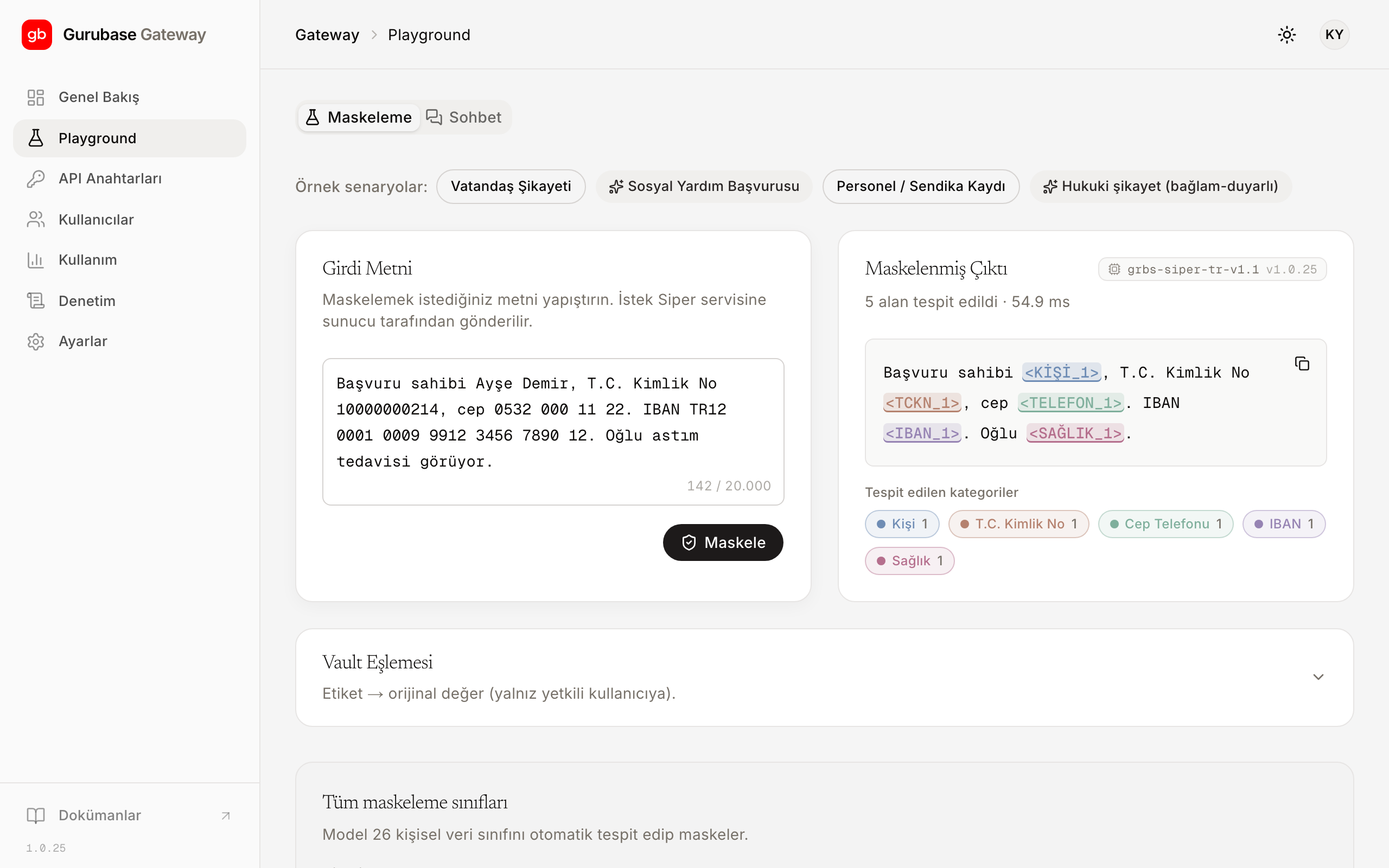
## Masking preview
As you type the text, the panel highlights the detected personal data
instantly. Each category is highlighted in its own color; the masked output
sits right next to it. Before you send a request, you know the final form of
the text that will go to the model.
## Ready-made examples
You can start with one of the ready-made examples; it looks like this:
```text
Girdi : "Ayşe Demir, ayse.demir@ornek.gov.tr, 0532 000 11 22'den ulaşılabilir."
Maskeli: ", , 'den ulaşılabilir."
```
> **Label language**
>
> Turkish labels such as `` here are specific to the panel display.
> If you call the API directly, the output is in English (``, ``);
> see [Concepts](/en/concepts) for the details of this distinction.
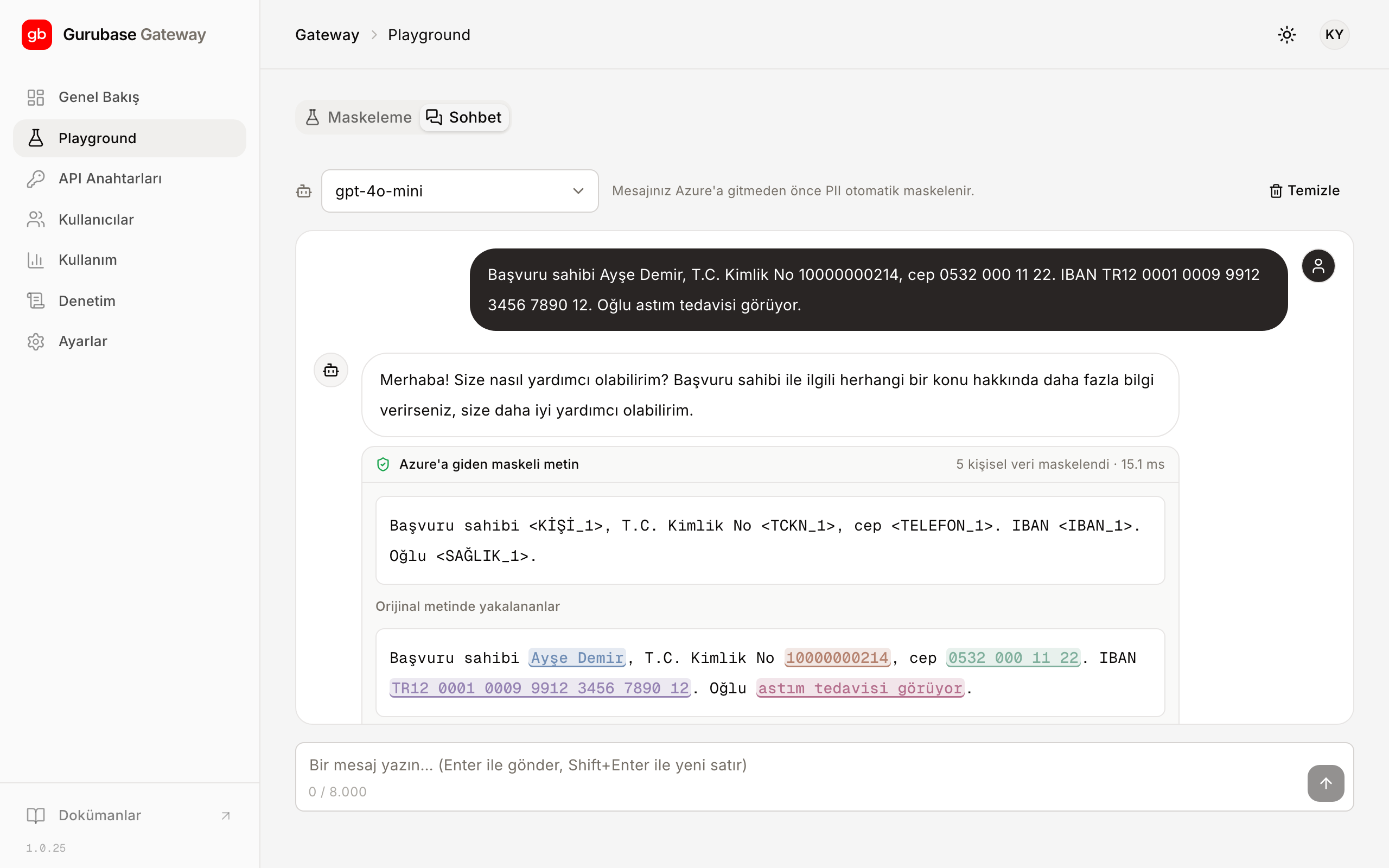
## Chat
You can go beyond the preview and try the flow end to end:
1. Type the text; the masked preview appears.
2. Send it; the Gateway forwards the masked text to the model.
3. The response streams in; placeholders are preserved in the response as-is.
This way, the masked form of the text going to the language model is in front
of you at every step.
To bring the flow you see here into your application, continue with the
[Gateway integration](/en/guides/gateway-integration) guide; the full
list of masked categories is on the [Categories](/en/categories) page.
---
# Limits and quotas
Source: https://siper.gurubase.ai/docs/en/limits/
In normal use you will not hit a limit; the limits are deliberately generous.
Two mechanisms apply to your account: a periodic token budget and a per-key
requests-per-minute limit. The goal is not to restrict usage; it is to keep
the service predictable for everyone.
## Token budget
All your requests are deducted from a single token budget defined for the
period. Unused tokens do not expire at the end of the period; the budget
rolls over and accumulates.
When the budget is used up, the service is not cut off. A warning appears in
the panel when you reach 80% of the budget and another when the budget is
used up; your requests keep being processed. Remaining tokens, usage rate,
and the thresholds are shown live on the "Token Bütçesi" (Token Budget) card
in the panel; see [Panel](/en/panel) for where the card is.
## Requests per minute (RPM)
A requests-per-minute (RPM) limit can optionally be defined for each virtual
key. The default is unlimited; the limit applies only when explicitly set and
protects the service during short bursts of load. The value applied to your
key is shown in the key list in the panel; if there is no value, the key is
unlimited.
## The 429 response and Retry-After
If you reach the RPM limit, the Gateway returns an OpenAI-compatible 429
response:
```http
HTTP/1.1 429 Too Many Requests
Retry-After: 2
Content-Type: application/json
{
"error": {
"type": "rate_limit_exceeded",
"message": "Dakika başına istek limiti aşıldı."
}
}
```
The `Retry-After` header tells you how many seconds to wait before trying
again. Most OpenAI SDKs retry a 429 on their own; if you are writing your own
client, add retries with increasing intervals.
A 429 is not a quota overrun. When your token budget is used up, requests do
not stop, and you only see a warning; a 429 is returned only for the momentary
rate limit and resolves on its own once the `Retry-After` period passes.
## Summary
| Limit | Default | Behavior when exceeded | Where it is shown |
| --- | --- | --- | --- |
| Token budget | Periodic, rolls over | Warning; service is not cut off | Token Budget card in the panel |
| RPM | Unlimited; configurable per key | `429` + `Retry-After` | Key list in the panel |
If you would like to increase your budget or define a custom limit for a key,
get in touch with us.
---
# Panel
Source: https://siper.gurubase.ai/docs/en/panel/
You manage the Gateway from the panel at
[https://gateway-tr.gurubase.io](https://gateway-tr.gurubase.io): virtual
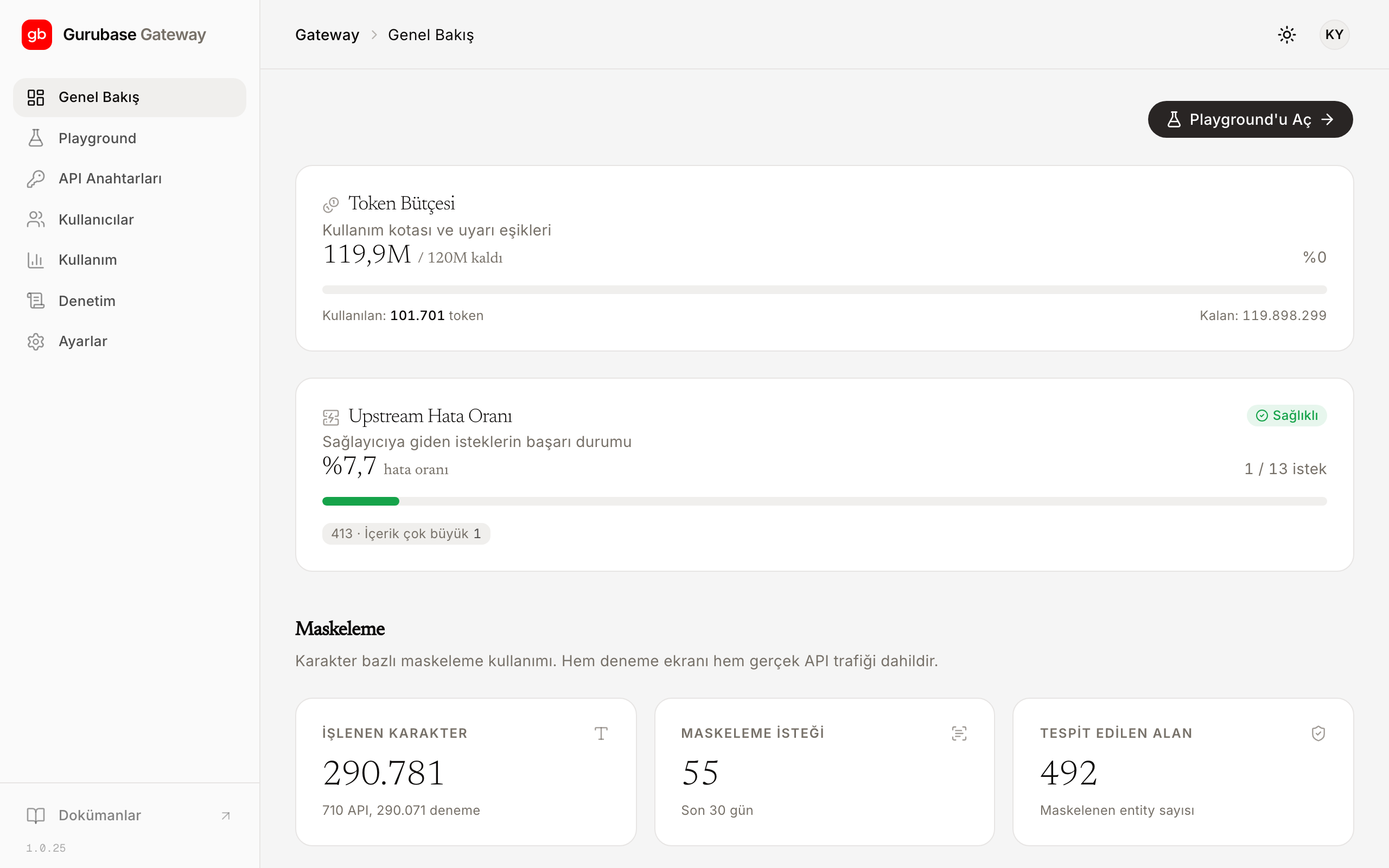
keys, usage tracking, quota, and users in one place. The panel UI is in
Turkish. When you sign in, the "Genel Bakış" (Overview) screen opens; this is
where you see the state of your token budget, the error rate of requests going
to the provider, and the masking counters.
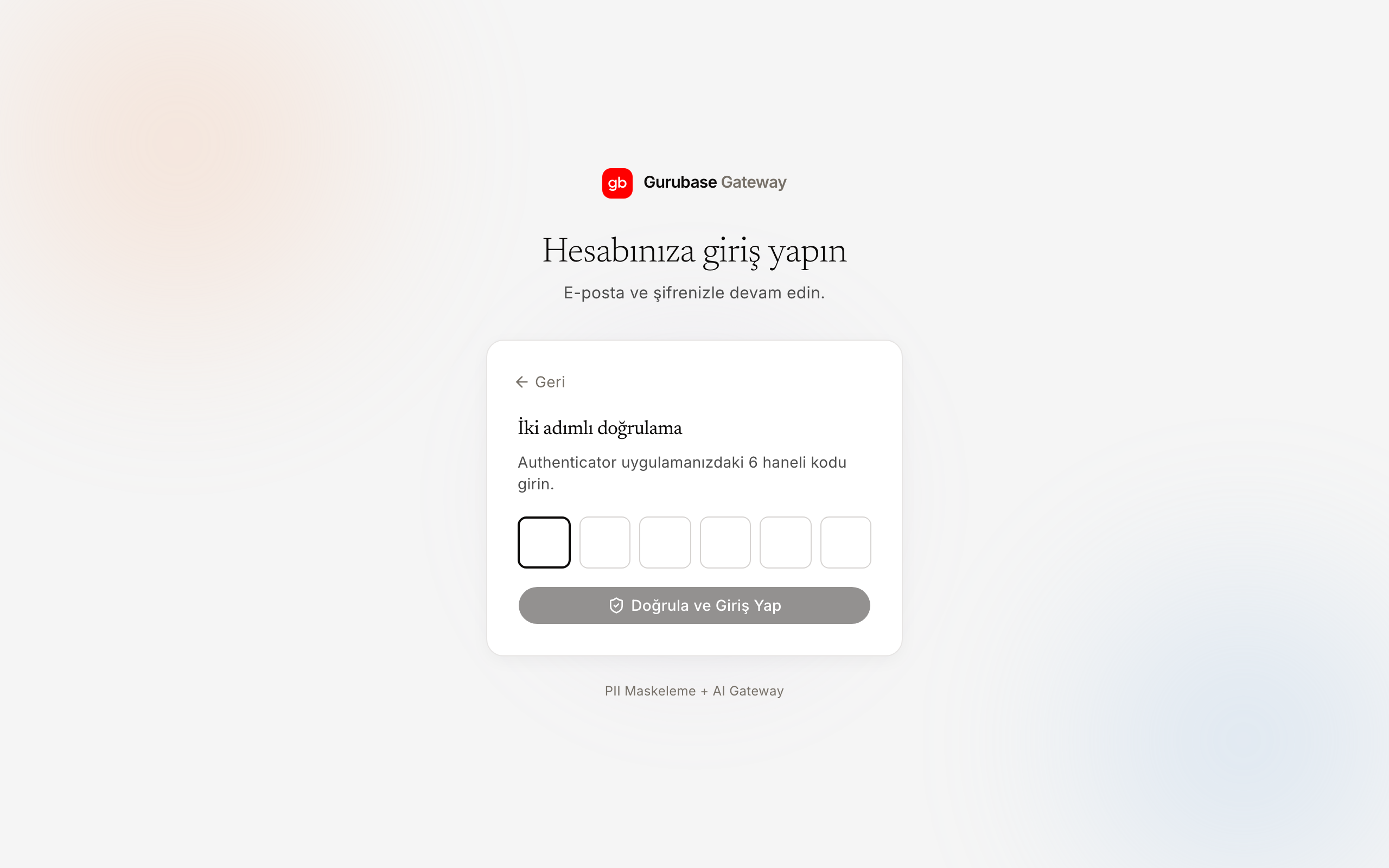
## Sign-in and MFA
You sign in to the panel with your email and password. On first sign-in, you
are asked to set up multi-factor authentication (MFA): you scan the QR code
with a TOTP app (such as Google Authenticator or 1Password) and enter the
generated 6-digit code. On later sign-ins, the current code is requested
alongside your password. MFA cannot be skipped; if a user changes phones and
can no longer generate codes, an administrator resets their verification.
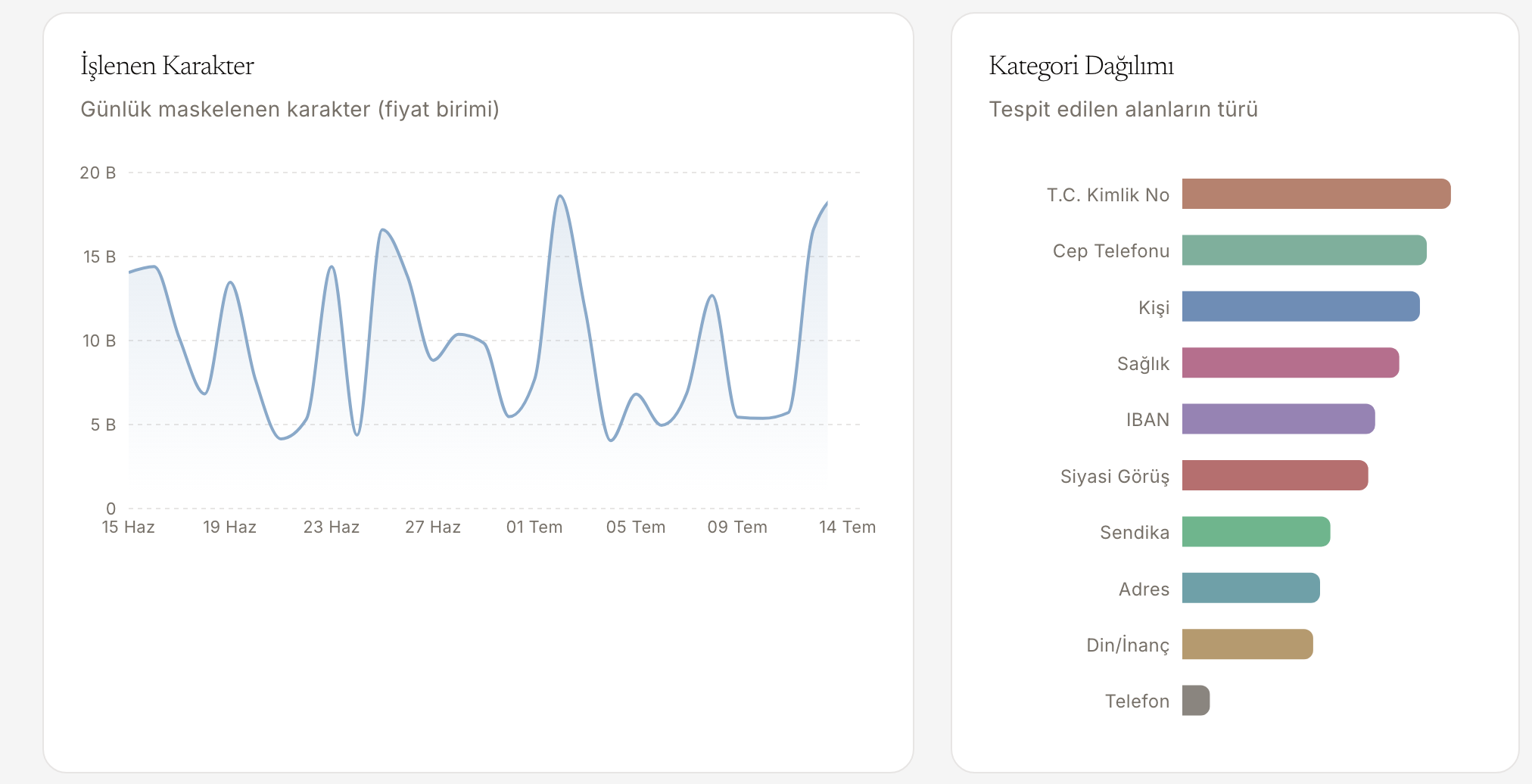
## Usage charts
The "Kullanım" (Usage) screen shows request and token counts for the time
range you select, split into input and output. The daily
processed-characters chart and the distribution of detected categories are on
the same screen; with the model and virtual key breakdown, you can track
which key consumes what.
## Quota and alerts
Your token budget sits on a live card in the panel: used, remaining, and
warning thresholds. The card warns you at the 80% and full thresholds; the
service is not cut off. For details of the budget model and the 429 behavior,
see [Limits and quotas](/en/limits).

## User management
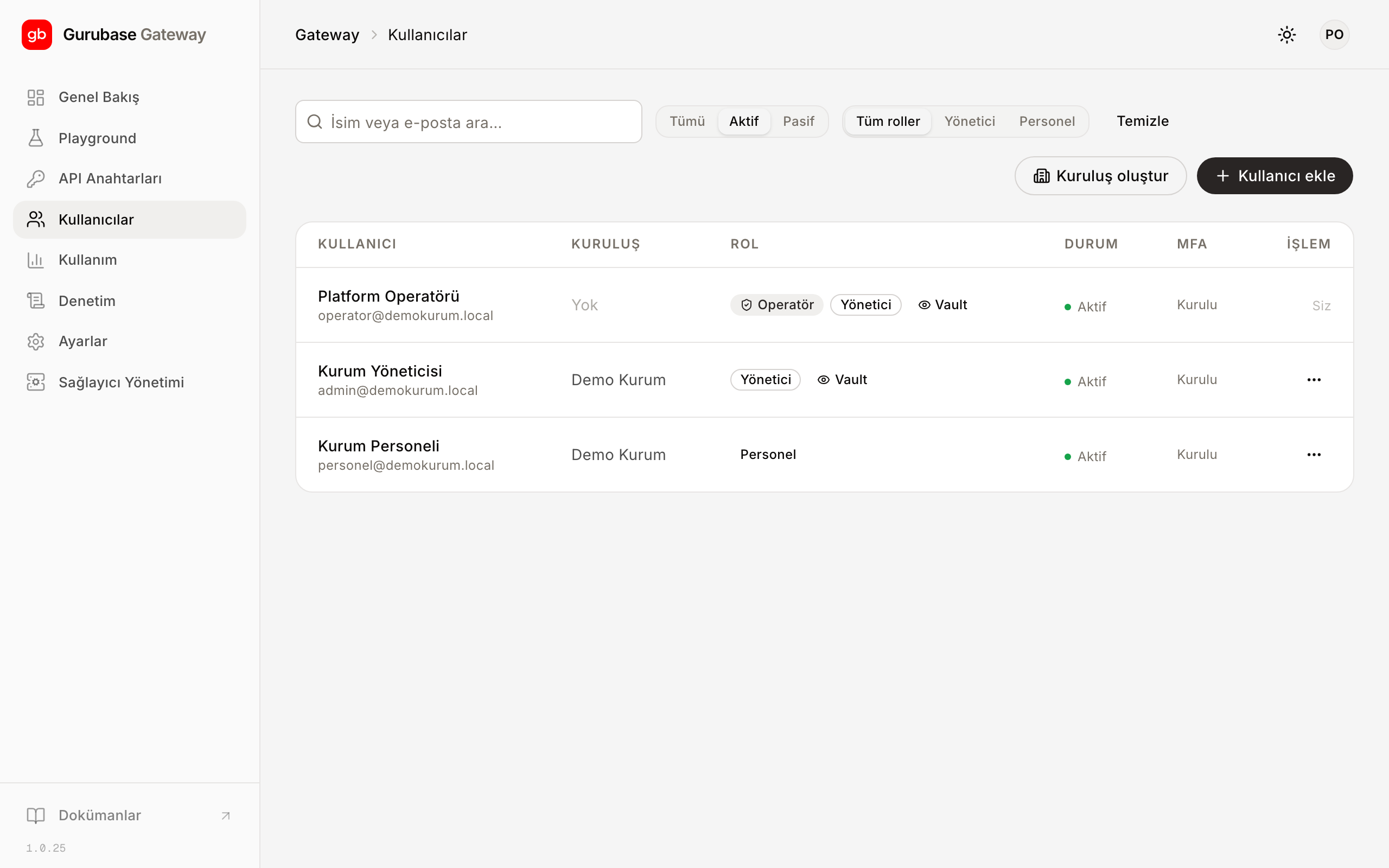
You manage your organization's accounts from the "Kullanıcılar" (Users)
screen. You invite new users and assign roles; permissions are role-based
(RBAC). You can deactivate an account and, when needed, reset its MFA setup.
Each user's virtual keys and quota usage are also tracked from the same
screen.
## Key management
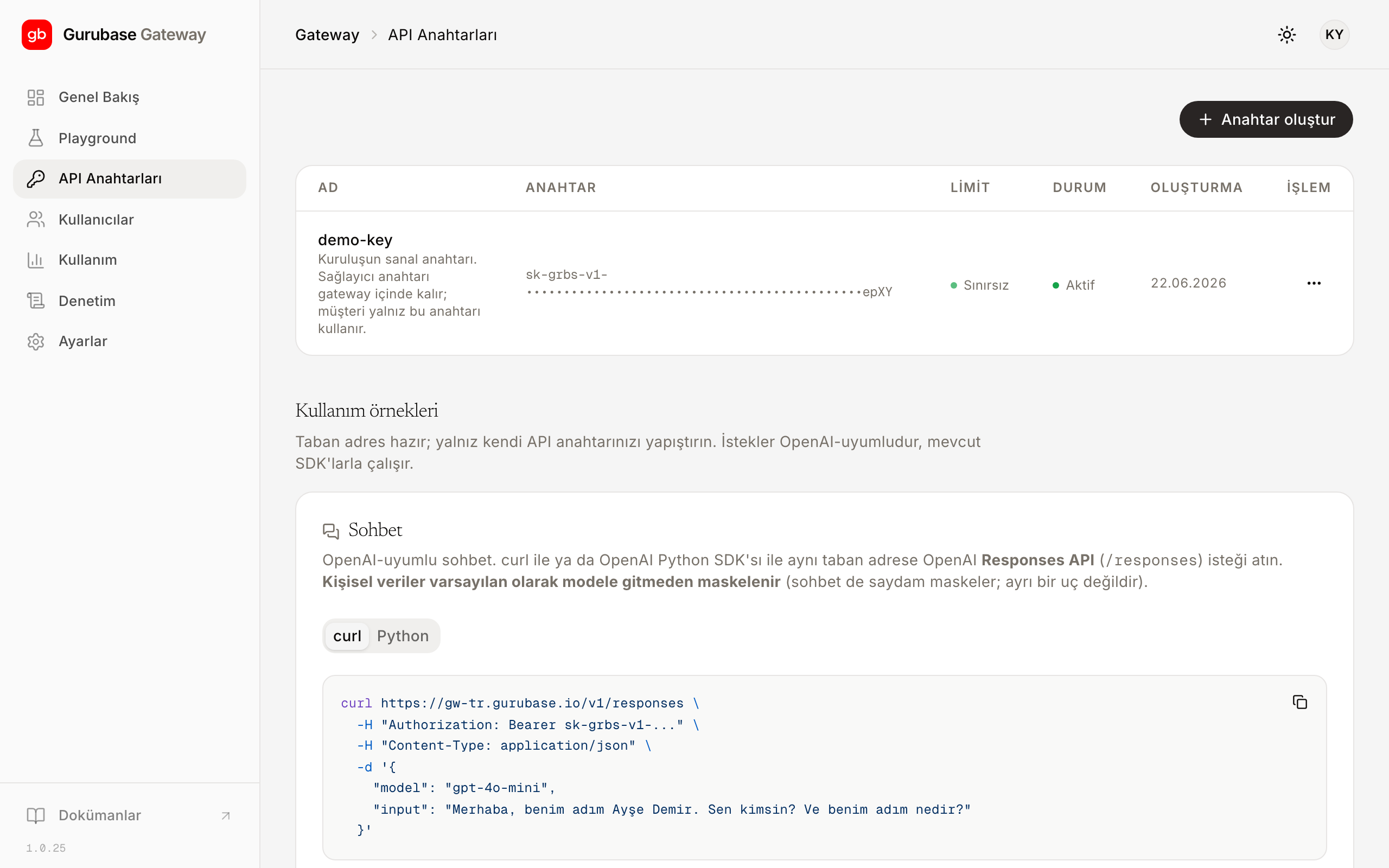
You generate, rotate, and revoke virtual keys from the "Anahtarlar" (Keys)
screen. A generated key is shown in full only at the moment of creation; save
it somewhere safe right then. Afterwards, only a masked summary remains in the
list. The language model provider's real key is visible neither in the panel
nor in the client; it stays inside the Gateway. To wire the key into your
application, see [Gateway integration](/en/guides/gateway-integration).
If you want to try masking without writing code, the Playground in the panel
is enough; the [Playground](/en/guides/playground) guide walks through the
flow.
---
# Release notes
Source: https://siper.gurubase.ai/docs/en/release-notes/
Changes released in Siper are listed on this page from newest to oldest.
## July 8, 2026
**Improvement:** The date of birth category now recognizes more written
forms: the month spelled out ("7 Mart 1985"), the ISO format ("1992-10-12"),
and two-digit years ("15.03.85"). Detection requires a birth context; dates
that do not indicate a birth, such as contract or invoice dates, are not
masked. For the full list of categories, see [Categories](/en/categories).
**Improvement:** A user reported that when a block that masks fine in a short
text is repeated many times in the same request, some names could slip
through. The issue is fixed; detection is now stable in long, repetitive
texts. In addition, the same value gets the same numbered placeholder no
matter how many times it appears in the text; for example, the same name
becomes `` everywhere it appears. Personal data written with
different Unicode renderings of regular letters, such as script, bold, or
fullwidth forms, is now detected as well. See [Concepts](/en/concepts) for
the placeholder format.
## July 3, 2026
**Improvement:** The default response of the `/mask` and `/mask/batch`
endpoints has been simplified. The response now consists of the
`masked_text`, `transform`, `spans` (category, character range, and
confidence score), and `timings_ms.total` fields; internal fields were
removed from the response. You will find the field descriptions in the
[Mask-only usage](/en/guides/mask-only) guide.
**Fix:** People trying the product for the first time often paste widely
known test ID numbers; because these numbers were on a deliberate exception
list, they were not masked, which created the impression that the product
"does not work". The exception has been removed: the well-known test number
published by NVİ (Turkey's civil registry authority) is now masked. The same
applies to known test tax identification numbers written with a tax number
context. To try it with your own text, see
[Playground](/en/guides/playground).
## June 23, 2026
**Fix:** Resolved following a user report: when an ID number was referred to
in the text only with the abbreviation "TC", in some cases it was not masked.
This spelling is now masked too. For the full list of categories, see
[Categories](/en/categories).
---
# Security
Source: https://siper.gurubase.ai/docs/en/security/
Personal data is masked in Turkey before it goes to the external language
model; the rest of the security model exists to keep that sentence true. On
this page you will find what happens when something fails, what is not
stored, and who can access the panel and how.
## Personal data is masked before it reaches the model
Every request passes through the masking step before the language model is
called. Only masked text goes to the model; detected values are replaced with
placeholders such as ``. See [Concepts](/en/concepts) for the
placeholder format.
## Response masking (output guardrails)
Input is masked on every request. If the organization requests it, the
response side is enabled as well: if the model produces personal data in its
response or repeats personal data from the input, those values are masked
before they return to the client. The feature does not change the default
behavior. It is not applied to streaming responses: to avoid breaking the
real-time stream, the response passes through as-is, and this is recorded in
the audit trail.
## If masking cannot be performed, the request stops
Masking works fail-closed: when masking cannot be completed, the request does
not go to the external model, the Gateway returns a 502, and the original
text is not forwarded either. When in doubt, the request does not pass. The
details of this behavior are on the [Concepts](/en/concepts) page.
## Masking on/off (passthrough)
Masking is on by default, and that is the usage we recommend. If the
organization wishes, masking can be turned off for a specific virtual key;
requests from that key go directly to the language model, and for that key
the Gateway acts as a plain AI gateway. The setting is per key: masked and
passthrough keys can run side by side in the same organization. It is changed
from the panel and takes effect immediately; masking stays on for every key
unless you turn it off.
> **KVKK responsibility**
>
> Personal data sent through a key with masking turned off is forwarded to
> the language model unmasked; for that traffic, responsibility under KVKK
> (Turkey's personal data protection law) rests entirely with the
> organization. Turn masking off only for keys you are sure carry no personal
> data; if you are not sure, leave it on.
## No data retention
Raw personal data is not stored permanently. The mapping (vault) that makes
it possible to go from a placeholder back to the original value is off by
default; it is produced only when explicitly requested and is not logged.
## Data sovereignty
Masking runs on infrastructure hosted in Turkey and before the model call.
The platform and the masking model are hosted on DT Cloud servers in
Istanbul. Only masked text goes to the model abroad; raw personal data is
processed in Turkey and stays there.
For organizations that want to run the infrastructure entirely on their own
systems, an on-premise deployment option is also available; for details,
[contact us](https://siper.gurubase.ai/iletisim).
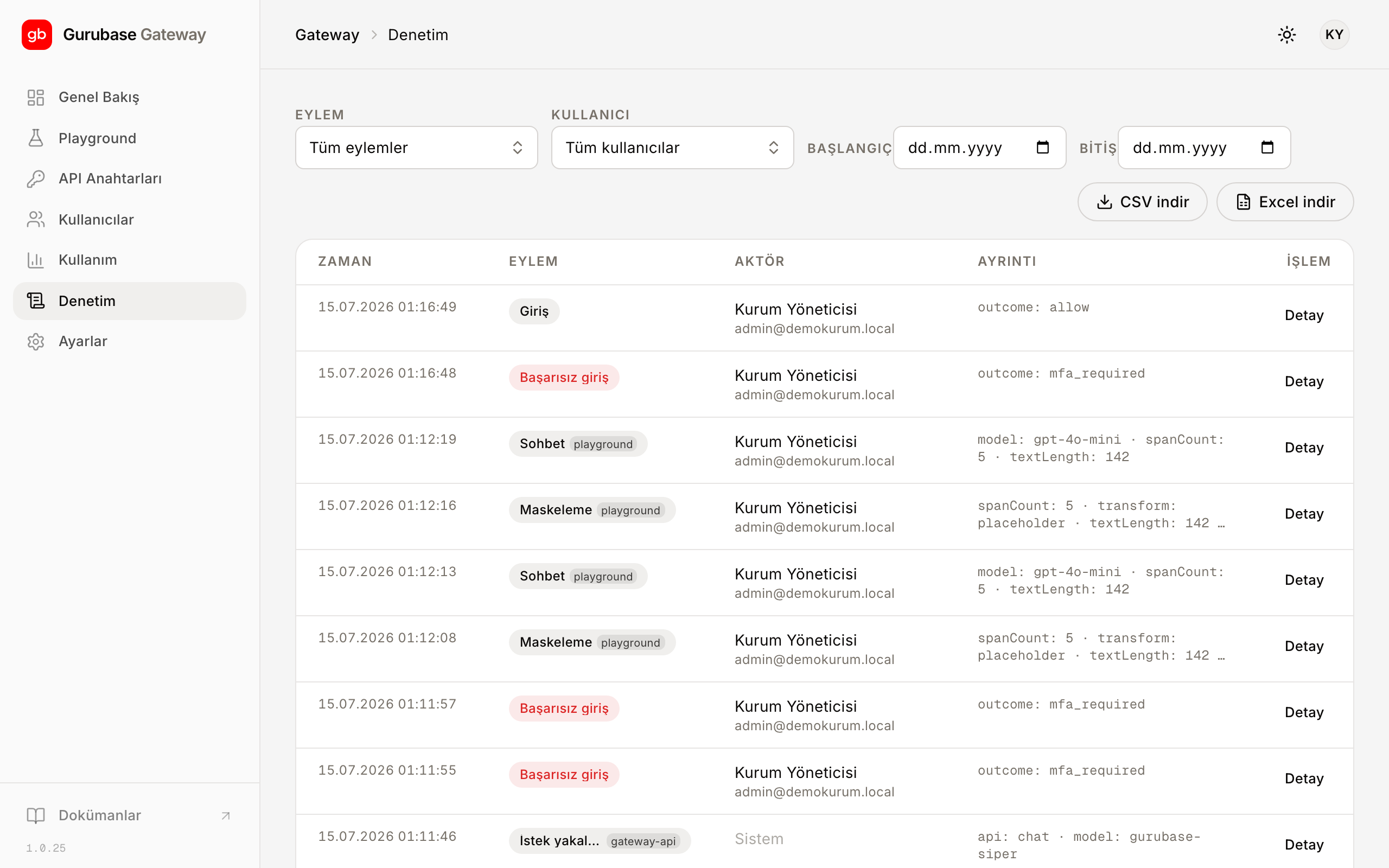
## Audit trail
Administrative events (sign-ins, MFA setups; key generation, rotation, and
revocation; user and quota changes) are written to an append-only audit
trail. Records are not modified after the fact; only new records are added to
the trail, and the trail can be exported as CSV or Excel. For masking events,
metadata such as category and detection count is kept; the trail contains no
surface text, and the masked text itself is not recorded.
## Access security
Signing in to the panel requires email, password, and a mandatory TOTP code;
permissions are role-based. Traffic is encrypted with TLS. The language model
provider's real key stays inside the Gateway only; the panel and clients work
with virtual keys. See [Panel](/en/panel) for the panel steps.
## Masked categories
Masking covers 26 categories; alongside general categories such as name, TCKN
(Turkish national ID number), and IBAN, the special categories of personal
data under Article 6 of KVKK are also in scope. See [Categories](/en/categories) for
the full list and synthetic examples.
---
# Başlangıç
Source: https://siper.gurubase.ai/docs/getting-started/
İlk isteğiniz için iki adres ve bir sanal anahtar yeter. Kurulum yok; OpenAI
SDK kullanıyorsanız yalnız `base_url` değerini ve anahtarı değiştirirsiniz,
kodunuzun
geri kalanına dokunmazsınız.
## Erişim bilgileriniz
| Kullanım | Adres |
| ---------------------------------- | -------------------------------- |
| API tabanı (OpenAI SDK `base_url`) | `https://gw-tr.gurubase.io/v1` |
| Yönetim paneli | `https://gateway-tr.gurubase.io` |
## Sanal anahtarınızı üretin
[Panele](https://gateway-tr.gurubase.io) giriş yapın ve bir sanal anahtar
üretin; isteklerinizi bu anahtarla gönderirsiniz. Dil modeli sağlayıcısının
gerçek anahtarı Gateway içinde kalır, uygulamanızda tutmanız gerekmez.
Adımlar için [Panel](/panel).
## İlk istek
Aşağıdaki üç örnek de Responses API'ye aynı isteği gönderir. Metinde bir ad ve
bir TCKN var; ikisi de modele gitmeden önce maskelenir.
```bash title="curl"
curl https://gw-tr.gurubase.io/v1/responses \
-H "Authorization: Bearer $SANAL_ANAHTAR" \
-H "Content-Type: application/json" \
-d '{
"model": "gpt-4o-mini",
"input": "Ayşe Demir, TCKN 10000000214, başvuru durumunu soruyor."
}'
```
```python title="Python"
from openai import OpenAI
client = OpenAI(
base_url="https://gw-tr.gurubase.io/v1",
api_key="SANAL_ANAHTAR",
)
resp = client.responses.create(
model="gpt-4o-mini",
input="Ayşe Demir, TCKN 10000000214, başvuru durumunu soruyor.",
)
print(resp.output_text)
```
```ts title="TypeScript"
import OpenAI from "openai";
const client = new OpenAI({
baseURL: "https://gw-tr.gurubase.io/v1",
apiKey: process.env.SANAL_ANAHTAR,
});
const resp = await client.responses.create({
model: "gpt-4o-mini",
input: "Ayşe Demir, TCKN 10000000214, başvuru durumunu soruyor.",
});
console.log(resp.output_text);
```
## Ne oldu?
Girdinizdeki ad ve TCKN, modele giden kopyada yer tutucularla değiştirildi:
```text
Girdi : "Ayşe Demir, TCKN 10000000214, başvuru durumunu soruyor."
Modele: ", TCKN , başvuru durumunu soruyor."
```
Model maskeli metinle çalışır; yanıt dönerken aynı yer tutucular korunur. Yer
tutucular API çıktısında İngilizcedir; yer tutucuların biçimini ve panel
gösteriminden farkını [Kavramlar](/concepts) sayfasında bulursunuz.
## Sıradaki adımlar
Yer tutucu formatı, fail-closed davranış ve veri egemenliği.
Streaming, Chat Completions ve yalnız maskeleme.
Maskelenen 26 kişisel veri kategorisinin tam listesi.
Sanal anahtar üretimi ve kullanım takibi.
---
# Gateway entegrasyonu
Source: https://siper.gurubase.ai/docs/guides/gateway-integration/
Mevcut OpenAI entegrasyonunuzu Gateway'e taşırken yalnız iki değer değişir:
- `base_url` → `https://gw-tr.gurubase.io/v1`
- API anahtarı → [panelden](https://gateway-tr.gurubase.io) ürettiğiniz sanal anahtar
Gerisi standart OpenAI SDK'sıdır; model adı, parametreler ve yanıt biçimi aynı
kalır. Maskeleme her istekte otomatik çalışır: girdi, modele iletilmeden önce
maskelenir.
## Drop-in geçiş
Aşağıdaki örneklerde yalnız `base_url` ve anahtar satırları Gateway'e özgüdür;
kodun kalanı, doğrudan sağlayıcıya giden sürümle aynıdır.
### Responses API
Varsayılan yol Responses API'dir. Örnekteki ad ve TCKN, modele gitmeden
maskelenir.
```python title="Python"
from openai import OpenAI
client = OpenAI(
base_url="https://gw-tr.gurubase.io/v1",
api_key="SANAL_ANAHTAR",
)
resp = client.responses.create(
model="gpt-4o-mini",
input="Ahmet Yılmaz, TCKN 10000000382, adres değişikliği istiyor.",
)
print(resp.output_text)
```
```bash title="curl"
curl https://gw-tr.gurubase.io/v1/responses \
-H "Authorization: Bearer $SANAL_ANAHTAR" \
-H "Content-Type: application/json" \
-d '{
"model": "gpt-4o-mini",
"input": "Ahmet Yılmaz, TCKN 10000000382, adres değişikliği istiyor."
}'
```
```ts title="TypeScript"
import OpenAI from "openai";
const client = new OpenAI({
baseURL: "https://gw-tr.gurubase.io/v1",
apiKey: process.env.SANAL_ANAHTAR,
});
const resp = await client.responses.create({
model: "gpt-4o-mini",
input: "Ahmet Yılmaz, TCKN 10000000382, adres değişikliği istiyor.",
});
console.log(resp.output_text);
```
### Chat Completions
Kodunuz `chat.completions` kullanıyorsa Responses API'ye geçmeniz gerekmez;
aynı iki değişiklik burada da yeter. Bundan sonraki Python ve TypeScript
örnekleri, yukarıda tanımlanan `client` ile devam eder.
```python title="Python"
resp = client.chat.completions.create(
model="gpt-4o-mini",
messages=[
{"role": "user", "content": "Ayşe Demir'in talebini özetle."},
],
)
print(resp.choices[0].message.content)
```
```bash title="curl"
curl https://gw-tr.gurubase.io/v1/chat/completions \
-H "Authorization: Bearer $SANAL_ANAHTAR" \
-H "Content-Type: application/json" \
-d '{
"model": "gpt-4o-mini",
"messages": [
{ "role": "user", "content": "Ayşe Demir'\''in talebini özetle." }
]
}'
```
```ts title="TypeScript"
const resp = await client.chat.completions.create({
model: "gpt-4o-mini",
messages: [{ role: "user", content: "Ayşe Demir'in talebini özetle." }],
});
console.log(resp.choices[0].message.content);
```
## Streaming
`stream: true` verdiğinizde yanıt SSE ile parça parça akar. Maskelemenin yeri
değişmez: girdi modele gitmeden maskelenir, akış maskeli metin üzerinden
üretilir.
```python title="Python"
stream = client.chat.completions.create(
model="gpt-4o-mini",
stream=True,
messages=[{"role": "user", "content": "Toplantı notlarını madde madde özetle."}],
)
for chunk in stream:
print(chunk.choices[0].delta.content or "", end="", flush=True)
```
```ts title="TypeScript"
const stream = await client.chat.completions.create({
model: "gpt-4o-mini",
stream: true,
messages: [{ role: "user", content: "Toplantı notlarını madde madde özetle." }],
});
for await (const chunk of stream) {
process.stdout.write(chunk.choices[0]?.delta?.content ?? "");
}
```
## Yalnız maskeleme (`gurubase-siper`)
Metni dil modeline göndermeden, aynı uçtan yalnız maskeleme alabilirsiniz. `model`
alanına rezerve `gurubase-siper` değerini verin; Gateway metni maskeler ve
maskeli halini doğrudan döndürür.
```bash
curl https://gw-tr.gurubase.io/v1/responses \
-H "Authorization: Bearer $SANAL_ANAHTAR" \
-H "Content-Type: application/json" \
-d '{
"model": "gurubase-siper",
"input": "Vatandaş Ahmet Yılmaz, TCKN 10000000382, başvuru durumu nedir?"
}'
```
Maskeli metin `output_text` alanında döner:
```text
Vatandaş , TCKN , başvuru durumu nedir?
```
İstek hiçbir dil modeline gitmez; `gurubase-siper` bir dil modeli değil,
Gateway'in maskeleme için ayırdığı rezerve model adıdır ve Chat Completions
ile de çalışır.
Maskeleme yapılamazsa istek 502 ile durur, ham metin de dönmez (fail-closed).
Tespit raporuna (kategori ve konum listesi) da ihtiyacınız varsa doğrudan
`/mask` ucunu kullanın: [Yalnız maskeleme](/guides/mask-only).
## Sanal anahtar
Tüm istekler `Authorization: Bearer` başlığındaki sanal anahtarla doğrulanır.
Sanal anahtarı panelden üretirsiniz; gerçek sağlayıcı anahtarı yalnız Gateway
içinde durur, uygulamanızda tutmanız gerekmez. Bir anahtarı panelden iptal
edip yenisini üretebilirsiniz. Adımlar için [Panel](/panel).
## Modelleri listeleme
Erişebildiğiniz modelleri `/v1/models` ucundan alırsınız; listede rezerve
`gurubase-siper` adı da görünür.
```bash
curl https://gw-tr.gurubase.io/v1/models \
-H "Authorization: Bearer $SANAL_ANAHTAR"
```
Maskelemeyi Gateway olmadan, kendi akışınızın bir adımı olarak kullanmak için
[Yalnız maskeleme](/guides/mask-only); kod yazmadan denemek için
[Playground](/guides/playground).
Kendi uygulamanızı yazmak yerine hazır bir kurumsal asistan arıyorsanız
[Gurubase](https://gurubase.io) kurumun bilgi kaynaklarına (Confluence,
Zendesk, Google Drive, web sitesi ve benzeri) bağlanan, yanıtlarını bu
kaynaklara dayandırıp kaynak gösteren ajanlar sunar; bulut veya kurum içi
(on-premise) kurulabilir.
---
# Yalnız maskeleme
Source: https://siper.gurubase.ai/docs/guides/mask-only/
Maskelemeyi dil modeli olmadan, kendi akışınızın bir adımı olarak da
kullanabilirsiniz. `/mask` ucu metni alır; maskeli metinle birlikte hangi
aralıkta ne bulunduğunu gösteren bir tespit raporu döndürür.
İstekleri, panelden ürettiğiniz sanal anahtarla `Authorization: Bearer`
başlığında yetkilendirirsiniz; Gateway çağrılarında kullandığınız anahtarın
aynısıdır. `/mask` çağrıları da istek limitlerine ve denetim izine tabidir.
Gövde hataları (eksik veya bozuk istek) ve kimlik hataları Gateway'in hata
biçimiyle döner; alan doğrulama ayrıntıları ise maskeleme servisinin kendi
biçimiyle gelebilir.
## İlk çağrı
```bash
curl https://gw-tr.gurubase.io/mask \
-H "Authorization: Bearer $SANAL_ANAHTAR" \
-H "Content-Type: application/json" \
-d '{"text": "Ahmet Yılmaz, TCKN 10000000382, İstanbul'\''da yaşıyor."}'
```
```json
{
"masked_text": ", TCKN , İstanbul'da yaşıyor.",
"transform": "placeholder",
"spans": [
{ "category": "person", "start": 0, "end": 12, "score": 0.85 },
{ "category": "tckn", "start": 19, "end": 30, "score": 1.0 }
],
"timings_ms": { "total": 27.58 }
}
```
`masked_text` maskeli metindir; yer tutucular API'de İngilizcedir
([Kavramlar](/concepts)). `spans` listesi her tespit için kategoriyi, girdi
metnindeki karakter aralığını (`start`, `end`) ve güven puanını (`score`)
verir. `timings_ms.total` toplam işleme süresidir.
## Dönüşüm seçenekleri
`transform` alanı maskeli metnin biçimini belirler; varsayılan `placeholder`.
| Değer | Davranış |
| --- | --- |
| `placeholder` | Değeri `` gibi numaralı bir yer tutucuyla değiştirir; hangi kategoriden kaç değer geçtiği görünür kalır. |
| `mask` | Karakterleri dolgu karakteriyle örter; uzunluk korunur. Dolgu karakterini `mask_char` ile seçersiniz, varsayılan `#`. |
## Toplu istek
Birden çok metni `/mask/batch` ucuna tek istekte gönderirsiniz; `results`
dizisi girdiyle aynı sırada döner. Uzunluk sınırını aşan metin için `/mask`
413 döndürür. `/mask/batch`'te bu sınır, birleştirilmiş toplam metin
üzerinden uygulanır.
```bash
curl https://gw-tr.gurubase.io/mask/batch \
-H "Authorization: Bearer $SANAL_ANAHTAR" \
-H "Content-Type: application/json" \
-d '{
"texts": [
"Ahmet Yılmaz aradı.",
"IBAN: TR12 0001 0000 0000 0000 0000 01"
]
}'
```
## Kategori filtreleme
Varsayılan davranış 26 kategorinin tamamını maskelemektir. `categories`
alanıyla kapsamı daraltırsınız: bir `preset` seçersiniz, gerekirse `enable`
listesi kümeye kategori ekler, `disable` çıkarır. Kategori anahtarları,
rapordaki `category` değerleriyle aynıdır (`person`, `tckn`, `saglik` gibi).
| Preset | Kapsam |
| --- | --- |
| `ALL` | Tüm kategoriler; varsayılan davranışla aynı. |
| `KVKK` | Tüm KVKK kapsamı; `ALL` ile aynı küme. |
| `KVKK_SENSITIVE` | Yalnız m.6 özel nitelikli dokuz kategori. |
| `IDENTITY` | Yalnız kişi ve adres. |
| `IDENTIFIERS` | Yalnız numara ve kod türü tanımlayıcılar (TCKN, IBAN, telefon gibi). |
```json
{
"text": "...",
"categories": { "preset": "KVKK_SENSITIVE" }
}
```
Kategorilerin tam listesi ve m.6 ayrımı için [Kategoriler](/categories).
## Desen listeleri
İki liste alanıyla maskeleme kararına kendi kurallarınızı eklersiniz. İkisi de
düzenli ifade (regular expression, Python `re` sözdizimi) listesi alır;
geçersiz bir desen 422 döndürür.
- `allow_patterns`: tespit edilen bir alanın yüzey metni desenle eşleşiyorsa o
alan maskelenmez. Kişisel veri olmayan sabit değerler için kullanışlıdır;
örneğin ortak destek adresinizin veya kurum adınızın maskelenmesini
istemezsiniz.
- `block_patterns`: desenle eşleşen her metin parçası, model tespit etmemiş
olsa bile maskelenir. Kuruma özgü sicil, dosya veya müşteri numarası
biçimlerini garantiye almak için. Düz dize verirseniz kategori `custom`
olur; `{"pattern": ..., "category": ...}` nesnesiyle kategori atarsınız.
Mevcut bir tespitle çakışan eşleşme atlanır; tespit kazanır.
```json
{
"text": "...",
"allow_patterns": ["destek@kurum\\.example", "\\bDemo Kurum\\b"],
"block_patterns": [
"\\bMST-\\d{6}\\b",
{ "pattern": "\\bSICIL-\\d{6}\\b", "category": "custom" }
]
}
```
Yer tutucu biçimi ve dil ayrımı için [Kavramlar](/concepts). Aynı maskelemeyi
sohbet akışının içinde kullanmak için
[Gateway entegrasyonu](/guides/gateway-integration).
---
# MCP sunucusu
Source: https://siper.gurubase.ai/docs/guides/mcp/
Siper'in maskelemesini Claude Code gibi yapay zekâ araçlarının içinden
kullanabilirsiniz. Model Context Protocol (MCP), bu tür araçların dış
servisleri birer tool olarak çağırmasını tanımlayan açık bir standarttır;
Siper bu standartla konuşan bir demo sunucu yayınlar:
```text
https://siper.gurubase.ai/api/mcp
```
Sunucu tek tool sunar: Türkçe metindeki kişisel verileri maskeleyen
`mask_turkish_pii`. Metni bir dil modeline göndermeden önce bu tool'dan
geçirirsiniz; modele maskeli hali gider. Anahtar gerekmez. Taşıma katmanı
Streamable HTTP'dir; oturum da SSE de yok, her istek kendi başına yeterlidir.
Tool, 26 kategorinin tamamını maskeler; tam listeyi
[Kategoriler](/categories) sayfasında bulursunuz. Çıktıda değerlerin yerini
`` gibi numaralı yer tutucular alır; biçimin ayrıntısı
[Kavramlar](/concepts) sayfasında.
## Claude Code'a ekleme
Tek komut yeter:
```bash
claude mcp add --transport http siper-mask https://siper.gurubase.ai/api/mcp
```
Kurulumdan sonra Claude Code, gerektiğinde `mask_turkish_pii` tool'unu
kendiliğinden çağırabilir; "şu metni maskele" diyerek elle de
tetikleyebilirsiniz.
## Diğer istemciler
Cursor, VS Code ve benzeri istemciler için kurulum bağlantıları ile
yapılandırma örnekleri, endpoint adresini tarayıcıda açınca çıkan bilgi sayfasındadır:
[siper.gurubase.ai/api/mcp](https://siper.gurubase.ai/api/mcp). İstemcilerin sunucuyu
kendiliğinden tanıması için bir keşif kartı da yayında:
[server-card.json](https://siper.gurubase.ai/.well-known/mcp/server-card.json).
## Sınırlar
Bu sunucu ürünün kendisi değil, tanıtım amaçlı bir demo servistir; kendini
istemcilere `siper-mask-demo` adıyla tanıtır.
- Girdi (`text`) en çok 2.000 karakterdir.
- İstek sayısı sınırlıdır (rate limit).
- Anahtarsız çalışır; bu yüzden üretim yüzeyi değildir.
Üretim entegrasyonunda MCP demosu değil, ürün uçları kullanılır: sohbet
akışında otomatik maskeleme için Gateway'in `/v1` ucu
([Gateway entegrasyonu](/guides/gateway-integration)), maskelemeyi tek
başına bir adım olarak kullanmak için `/mask` API'si
([Yalnız maskeleme](/guides/mask-only)).
Demoyu deneyip çıktıyı beğendiyseniz sıradaki durak
[Başlangıç](/getting-started): sanal anahtarınızı alır, ilk maskeli isteğinizi
kendi kodunuzdan gönderirsiniz.
---
# Playground
Source: https://siper.gurubase.ai/docs/guides/playground/
Maskelemeyi denemenin en hızlı yolu paneldeki Playground'dur. Kod yazmazsınız:
metni yapıştırırsınız, maskeli halini ve modelin yanıtını aynı ekranda
görürsünüz.
## Maskeleme önizlemesi
Metni yazarken panel, tespit edilen kişisel verileri anında işaretler. Her
kategori kendi rengiyle vurgulanır; maskeli çıktı hemen yanında durur. İstek
göndermeden önce, modele gidecek metnin son halini bilirsiniz.

## Hazır örnekler
Hazır örneklerden biriyle başlayabilirsiniz; şöyle görünür:
```text
Girdi : "Ayşe Demir, ayse.demir@ornek.gov.tr, 0532 000 11 22'den ulaşılabilir."
Maskeli: ", , 'den ulaşılabilir."
```
> **Etiket dili**
>
> Buradaki `` gibi Türkçe etiketler panel gösterimine özgüdür.
> API'yi doğrudan çağırırsanız çıktı İngilizcedir (``, ``);
> ayrımın ayrıntısı için [Kavramlar](/concepts).
## Sohbet
Önizlemeyle kalmayıp akışı uçtan uca da deneyebilirsiniz:
1. Metni yazın; maskeli önizleme belirir.
2. Gönderin; Gateway maskeli metni modele iletir.
3. Yanıt akar; yer tutucular yanıtta olduğu gibi korunur.
Böylece dil modeline giden metnin maskeli hali her adımda gözünüzün önündedir.

Gördüğünüz akışı uygulamanıza taşımak için
[Gateway entegrasyonu](/guides/gateway-integration) rehberiyle devam
edin; maskelenen kategorilerin tam listesi [Kategoriler](/categories)
sayfasında.
---
# Limitler ve kotalar
Source: https://siper.gurubase.ai/docs/limits/
Normal kullanımda bir limite takılmazsınız; limitler bilerek cömert tutulur.
Hesabınıza uygulanan iki mekanizma vardır: dönemsel token bütçesi ve anahtar
bazında dakika başına istek limiti. Amaç kullanımı kısıtlamak değil; hizmetin
herkes için öngörülebilir kalması.
## Token bütçesi
Tüm istekleriniz, dönem için tanımlanan tek bir token bütçesinden düşülür.
Kullanılmayan token dönem sonunda yanmaz; bütçe devreder ve birikir.
Bütçe dolunca hizmet kesilmez. Bütçenin %80'ine geldiğinizde ve bütçe
dolduğunda panelde birer uyarı belirir; istekleriniz işlenmeye devam eder.
Kalan token, kullanım oranı ve eşikler paneldeki Token Bütçesi kartında canlı
görünür; kartın yeri için [Panel](/panel).
## Dakika başına istek (RPM)
Her sanal anahtar için dakika başına istek (requests per minute, RPM) limiti
isteğe bağlı olarak tanımlanabilir. Varsayılan sınırsızdır; limit yalnız
açıkça ayarlandığında uygulanır ve kısa süreli ani yükte hizmeti korur.
Anahtarınıza uygulanan değer paneldeki anahtar listesinde yazar; değer yoksa
anahtar sınırsızdır.
## 429 yanıtı ve Retry-After
RPM limitine ulaşırsanız Gateway, OpenAI ile uyumlu bir 429 yanıtı döndürür:
```http
HTTP/1.1 429 Too Many Requests
Retry-After: 2
Content-Type: application/json
{
"error": {
"type": "rate_limit_exceeded",
"message": "Dakika başına istek limiti aşıldı."
}
}
```
`Retry-After` başlığı kaç saniye sonra yeniden deneyebileceğinizi söyler. Çoğu
OpenAI SDK'sı 429'u kendiliğinden yeniden dener; kendi istemcinizi
yazıyorsanız artan aralıklarla yeniden deneme ekleyin.
429, kota aşımı değildir. Token bütçeniz dolduğunda istekler durmaz, yalnız
uyarı görürsünüz; 429 yalnız anlık hız limitinde döner ve `Retry-After`
süresi geçince kendiliğinden çözülür.
## Özet
| Limit | Varsayılan | Aşımda davranış | Nerede görünür |
| --- | --- | --- | --- |
| Token bütçesi | Dönemsel, devirli | Uyarı; hizmet kesilmez | Paneldeki Token Bütçesi kartı |
| RPM | Sınırsız; anahtara göre ayarlanabilir | `429` + `Retry-After` | Paneldeki anahtar listesi |
Bütçenizi büyütmek veya bir anahtara özel limit tanımlamak isterseniz bizimle
iletişime geçin.
---
# Panel
Source: https://siper.gurubase.ai/docs/panel/
Gateway'i [https://gateway-tr.gurubase.io](https://gateway-tr.gurubase.io)
adresindeki panelden yönetirsiniz: sanal anahtarlar, kullanım takibi, kota ve
kullanıcılar tek yerde. Giriş yaptığınızda Genel Bakış ekranı açılır; token
bütçenizin durumunu, sağlayıcıya giden isteklerdeki hata oranını ve maskeleme
sayaçlarını burada görürsünüz.

## Giriş ve MFA
Panele e-posta ve şifrenizle girersiniz. İlk girişte çok faktörlü doğrulama
(MFA) kurulumu istenir: bir TOTP uygulamasıyla (Google Authenticator, 1Password
gibi) QR kodu okutur, üretilen 6 haneli kodu girersiniz. Sonraki girişlerde
şifrenin yanında o anki kod sorulur. MFA atlanamaz; telefonunu değiştirip kod
üretemeyen bir kullanıcının doğrulamasını yönetici sıfırlar.

## Kullanım grafikleri
Kullanım ekranı, seçtiğiniz zaman aralığı için istek ve token sayısını
giriş/çıkış ayrımıyla gösterir. Günlük işlenen karakter grafiği ve tespit
edilen kategorilerin dağılımı aynı ekrandadır; model ve sanal anahtar
kırılımıyla hangi anahtarın ne tükettiğini izlersiniz.

## Kota ve alarmlar
Token bütçeniz panelde canlı bir kartta durur: kullanılan, kalan ve uyarı
eşikleri. Kart, %80 ve doluluk eşiklerinde sizi uyarır; hizmet kesilmez.
Bütçe modelinin ayrıntısı ve 429 davranışı için
[Limitler ve kotalar](/limits).

## Kullanıcı yönetimi
Kurum içi hesapları Kullanıcılar ekranından yönetirsiniz. Yeni kullanıcı davet
eder, rol atarsınız; yetkiler rol tabanlıdır (RBAC). Bir hesabı
pasifleştirebilir, gerektiğinde MFA kurulumunu sıfırlayabilirsiniz. Her
kullanıcının sanal anahtarları ve kota kullanımı da aynı ekrandan izlenir.

## Anahtar yönetimi
Sanal anahtarları Anahtarlar ekranından üretir, döndürür ve iptal edersiniz.
Üretilen anahtar tam haliyle yalnız oluşturma anında görünür; o anda güvenli bir
yere kaydedin. Sonrasında listede yalnız maskeli özeti kalır. Dil modeli
sağlayıcısının gerçek anahtarı panelde de istemcide de görünmez; Gateway
içinde durur. Anahtarı uygulamanıza bağlamak için
[Gateway entegrasyonu](/guides/gateway-integration).

Maskelemeyi kod yazmadan denemek isterseniz paneldeki Playground yeter;
akışı [Playground](/guides/playground) rehberi anlatır.
---
# Release notes
Source: https://siper.gurubase.ai/docs/release-notes/
Siper'de yayına alınan değişiklikler bu sayfada en yeniden en eskiye doğru
listelenir.
## 8 Temmuz 2026
**İyileştirme:** Doğum tarihi kategorisi artık daha fazla yazım biçimini
tanıyor: yazıyla ay ("7 Mart 1985"), ISO biçimi ("1992-10-12") ve iki haneli
yıl ("15.03.85"). Tespit için doğum bağlamı gerekir; sözleşme veya fatura
tarihi gibi doğum bildirmeyen tarihler maskelenmez. Kategorilerin tam listesi
için [Kategoriler](/categories).
**İyileştirme:** Bir kullanıcı, kısa metinde sorunsuz maskelenen bir bloğun
aynı istekte defalarca tekrarlanması durumunda bazı adların gözden
kaçabildiğini bildirdi. Sorun giderildi; uzun ve tekrarlı metinlerde tespit
artık kararlı. Ayrıca aynı değer metinde kaç kez geçerse geçsin hep aynı
numaralı yer tutucuyu alır; örneğin aynı ad her geçtiği yerde ``
olur. Normal harflerin süslü, kalın veya tam genişlik gibi farklı Unicode
yazımlarıyla yazılmış kişisel veriler de artık tespit ediliyor. Yer tutucu
biçimi için [Kavramlar](/concepts).
## 3 Temmuz 2026
**İyileştirme:** `/mask` ve `/mask/batch` uçlarının varsayılan yanıtı
sadeleşti. Yanıt artık `masked_text`, `transform`, `spans` (kategori, karakter
aralığı ve güven puanı) ile `timings_ms.total` alanlarından oluşur; iç alanlar
yanıttan çıkarıldı. Alanların açıklamasını
[Yalnız maskeleme](/guides/mask-only) rehberinde bulursunuz.
**Düzeltme:** Ürünü ilk kez deneyenler çoğu zaman herkesçe bilinen test kimlik
numaralarını yapıştırıyor; bu numaralar bilinçli bir istisna listesinde olduğu
için maskelenmiyordu ve "çalışmıyor" izlenimi doğuyordu. İstisna kaldırıldı:
NVİ'nin tanınmış test numarası artık maskelenir. Vergi numarası bağlamıyla
yazılmış bilinen test vergi kimlik numaraları için de aynısı geçerli. Kendi
metninizle denemek için [Playground](/guides/playground).
## 23 Haziran 2026
**Düzeltme:** Bir kullanıcı bildirimi üzerine giderildi: Kimlik numarası
metinde yalnız "TC" kısaltmasıyla anıldığında bazı durumlarda maskelenmiyordu.
Artık bu yazım da maskelenir. Kategorilerin tam listesi için
[Kategoriler](/categories).
---
# Güvenlik
Source: https://siper.gurubase.ai/docs/security/
Kişisel veri, dış dil modeline gitmeden önce Türkiye'de maskelenir; güvenlik
modelinin geri kalanı bu cümleyi ayakta tutmak için var. Bu sayfada hata
durumunda ne olduğunu, nelerin saklanmadığını ve panele kimin nasıl eriştiğini
bulursunuz.
## Kişisel veri modele gitmeden maskelenir
Her istek, dil modeli çağrılmadan önce maskeleme adımından geçer. Modele
yalnız maskeli metin gider; tespit edilen değerlerin yerinde `` gibi
yer tutucular vardır. Yer tutucu biçimi için [Kavramlar](/concepts).
## Yanıt maskeleme (output guardrails)
Girdi her istekte maskelenir. Kurum talep ederse yanıt tarafı da açılır:
model yanıtta kişisel veri üretir ya da girdideki kişisel veriyi yinelerse,
bu değerler istemciye dönmeden maskelenir. Özellik varsayılan davranışı değiştirmez. Streaming yanıtlarda uygulanmaz: gerçek
zamanlı akışı bozmamak için yanıt olduğu gibi geçer ve bu durum denetim izine
işlenir.
## Maskeleme yapılamazsa istek durur
Maskeleme fail-closed çalışır: maskeleme tamamlanamadığında istek dış modele
gitmez, Gateway 502 döndürür ve orijinal metni de iletmez. Kuşkulu durumda
istek geçmez. Davranışın ayrıntısı [Kavramlar](/concepts) sayfasında.
## Maskeleme aç/kapa (passthrough)
Maskeleme varsayılan olarak açıktır ve önerdiğimiz kullanım budur. Kurum
isterse belirli bir sanal anahtar için maskelemeyi kapatabilir; o anahtardan
gelen istekler doğrudan dil modeline gider, Gateway o anahtar için yalnız bir
yapay zekâ ağ geçidi gibi davranır. Ayar anahtar bazındadır: aynı kurumda
maskeli ve passthrough anahtarlar yan yana çalışabilir. Panelden değiştirilir,
anında devreye girer; siz kapatmadıkça her anahtarda maskeleme açık kalır.
> **KVKK sorumluluğu**
>
> Maskelemesi kapalı bir anahtardan gönderilen kişisel veri, maskelenmeden dil
> modeline iletilir; bu trafikte KVKK kapsamındaki sorumluluk tümüyle
> kurumdadır. Maskelemeyi yalnız kişisel veri taşımadığından emin olduğunuz
> anahtarlarda kapatın; emin değilseniz açık bırakın.
## Veri saklamama
Ham kişisel veri kalıcı olarak saklanmaz. Yer tutucudan orijinal değere
dönmeyi mümkün kılan eşleme (vault) varsayılan olarak kapalıdır; yalnız
açıkça istendiğinde üretilir ve loglanmaz.
## Veri egemenliği
Maskeleme, Türkiye'de barındırılan altyapıda ve model çağrısından önce
çalışır. Platform ve maskeleme modeli DT Cloud İstanbul sunucularında
barındırılır. Yurt dışındaki modele yalnız maskeli metin gider; ham kişisel
veri yurt içinde işlenir ve orada kalır.
Altyapıyı tamamen kendi sistemlerinde çalıştırmak isteyen kurumlar için
on-premise kurulum seçeneği de vardır; ayrıntılar için
[bizimle iletişime geçin](https://siper.gurubase.ai/iletisim).
## Denetim izi
Yönetimsel olaylar (girişler, MFA kurulumları; anahtar üretme, döndürme ve
iptal; kullanıcı ve kota değişiklikleri) salt ekleme (append-only) bir
denetim izine yazılır. Kayıtlar sonradan değiştirilmez, ize yalnız yeni kayıt
eklenir; iz CSV veya Excel olarak dışa aktarılabilir. Maskeleme olayları
için kategori ve tespit sayısı gibi üstveriler tutulur; iz yüzey metni
içermez, maskelenen metnin kendisi kayda geçmez.

## Erişim güvenliği
Panele giriş e-posta, şifre ve zorunlu TOTP koduyla yapılır; yetkiler rol
tabanlıdır. Trafik TLS ile şifrelenir. Dil modeli sağlayıcısının gerçek
anahtarı yalnız Gateway içinde durur; panel ve istemciler sanal anahtarla
çalışır. Panel adımları için [Panel](/panel).
## Maskelenen kategoriler
Maskeleme 26 kategoriyi kapsar; ad, TCKN, IBAN gibi genel kategorilerin
yanında KVKK'nın 6. maddesindeki özel nitelikli veriler de bu kapsamdadır. Tam liste ve sentetik örnekler için [Kategoriler](/categories).