Monitoring with Grafana
Monitor your organization's gateway usage live with Prometheus or Grafana Infinity; ready-made dashboards and alert rules.
The gateway publishes your organization’s usage metrics on two endpoints. Both return the same data; which one you use depends on what runs behind your Grafana.
| Endpoint | Format | When |
|---|---|---|
/api/v1/metrics |
Prometheus text format | You use Prometheus or Grafana Alloy |
/api/v1/usage |
JSON | No Prometheus; use the Grafana Infinity plugin |
The endpoints run on the panel address (for example
https://gateway-tr.gurubase.io). They return only your own organization’s
data; no request parameter can change that. Data is refreshed about every 15
seconds.
Metrics key
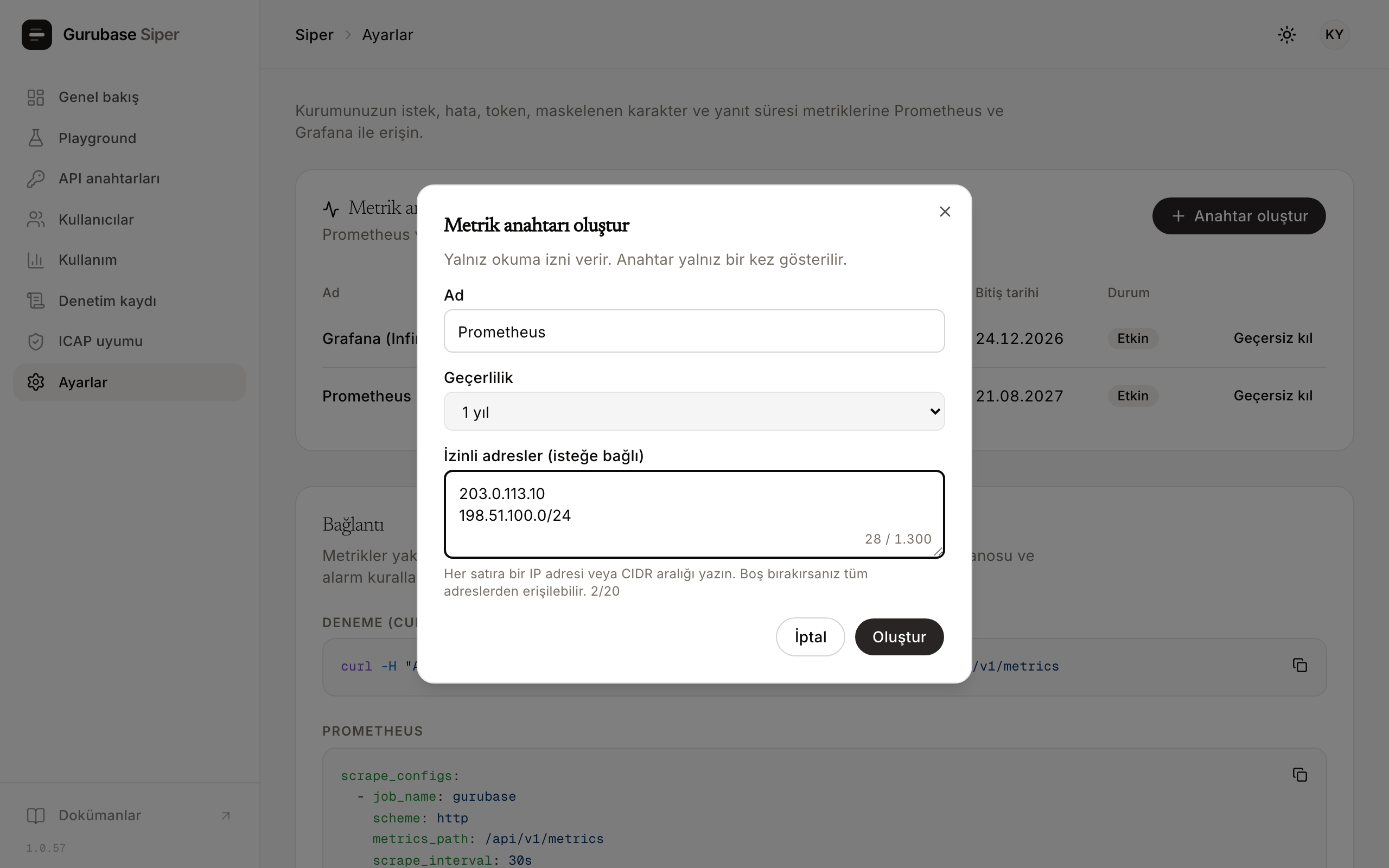
The endpoints work with a read-only key you create in the panel. An organization admin creates it under Settings > Monitoring.
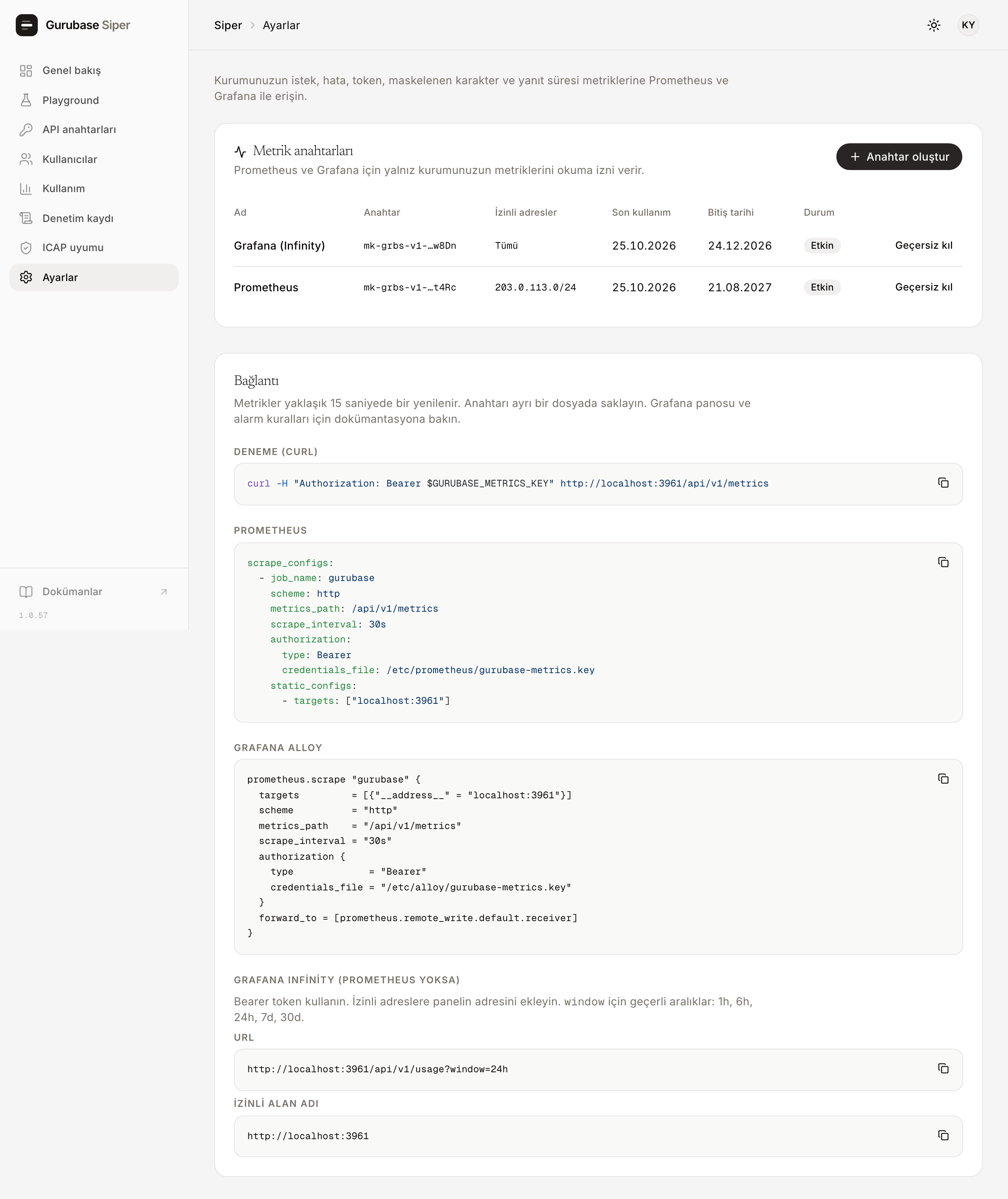
- The key only reads metrics. It cannot do anything else, such as managing organization regexes.
- An expiry date is required, at most one year.
- Optional: an address allowlist. The key then works only from the listed
addresses (for example
203.0.113.10or198.51.100.0/24). - The raw key is shown once, when it is created.
Keep the key in a separate file that only Prometheus can read instead of
writing it into the configuration. A wrong, expired or revoked key, or a key
used from an address outside its allowlist, gets the same 401 response.
To try it:
curl -H "Authorization: Bearer $GURUBASE_METRICS_KEY" \
  https://gateway-tr.gurubase.io/api/v1/metrics
Prometheus
scrape_configs:
  - job_name: gurubase
    scheme: https
    metrics_path: /api/v1/metrics
    scrape_interval: 30s
    authorization:
      type: Bearer
      credentials_file: /etc/prometheus/gurubase-metrics.key
    static_configs:
- targets: ["gateway-tr.gurubase.io"]prometheus.scrape "gurubase" {
targets = [{"__address__" = "gateway-tr.gurubase.io"}]
scheme = "https"
metrics_path = "/api/v1/metrics"
scrape_interval = "30s"
authorization {
type = "Bearer"
credentials_file = "/etc/alloy/gurubase-metrics.key"
}
forward_to = [prometheus.remote_write.default.receiver]
}Metrics
| Metric | Type | Labels | Counts |
|---|---|---|---|
gurubase_llm_requests_total |
counter | key_id, model, status |
LLM requests; status: 2xx, 4xx, 429_key_limit (the key’s own limit), 429_provider (model provider busy), 5xx, other |
gurubase_llm_input_tokens_total |
counter | key_id, model |
Tokens sent to the model |
gurubase_llm_output_tokens_total |
counter | key_id, model |
Tokens returned by the model |
gurubase_llm_request_duration_seconds |
histogram | key_id, model |
Duration of successful LLM calls |
gurubase_masking_requests_total |
counter | key_id |
Masking requests |
gurubase_masking_input_chars_total |
counter | key_id |
Characters sent to masking |
gurubase_masking_entities_total |
counter | key_id, category |
Masked personal data, by category |
gurubase_key_info |
gauge | key_id, key_name |
Key names; join to other series on key_id |
gurubase_last_ingest_age_seconds |
gauge | none | Seconds since the data was last refreshed |
Labels never contain a user, an e-mail or an IP address. Category names are the ones on the Categories page.
If gurubase_last_ingest_age_seconds grows beyond a few minutes, the data is
stale. A flat line then does not mean “no traffic”; alert on this series.
Example queries:
# Error rate over the last 5 minutes
sum(rate(gurubase_llm_requests_total{status!="2xx"}[5m]))
  / sum(rate(gurubase_llm_requests_total[5m]))

# p95 response time
histogram_quantile(0.95,
  sum by (le) (rate(gurubase_llm_request_duration_seconds_bucket[5m])))

# Requests with key names
sum by (key_id) (increase(gurubase_llm_requests_total[1h]))
  * on (key_id) group_left (key_name) max by (key_id, key_name) (gurubase_key_info)
Grafana Infinity (no Prometheus)
Add a data source with the Infinity plugin:
- Authentication: Bearer Token, the value is your metrics key.
- Allowed host: your panel address (for example
https://gateway-tr.gurubase.io). - URL:
https://gateway-tr.gurubase.io/api/v1/usage?window=24h
window can be 1h, 6h, 24h, 7d or 30d. Next to the totals, the
response carries the selected window split into time buckets under
window.points; Infinity cannot compute rates from counters, so charts are
drawn from this array.
{
  "last_ingest_age_seconds": 10,
  "keys": [{ "key_id": "vk-web", "key_name": "Web asistanı" }],
  "llm": [
    {
      "key_id": "vk-web",
      "model": "gpt-4o-mini",
      "requests_2xx": 252,
      "requests_4xx": 0,
      "requests_429_key_limit": 6,
      "requests_429_provider": 2,
      "requests_5xx": 1,
      "requests_other": 0,
      "input_tokens": 219137,
      "output_tokens": 83576
    }
  ],
  "latency": [
    { "key_id": "vk-web", "model": "gpt-4o-mini", "count": 252, "p50_seconds": 1.32, "p95_seconds": 4.35 }
  ],
  "window": {
    "name": "1h",
    "step_seconds": 60,
    "points": [{ "ts": "2026-10-23T11:20:00.000Z", "requests": 48, "errors": 2, "input_chars": 83120 }]
  }
}
Percentiles in latency are estimated from observations collected since the
gateway last started. For short-range percentiles, use the Prometheus endpoint.
Ready-made dashboards
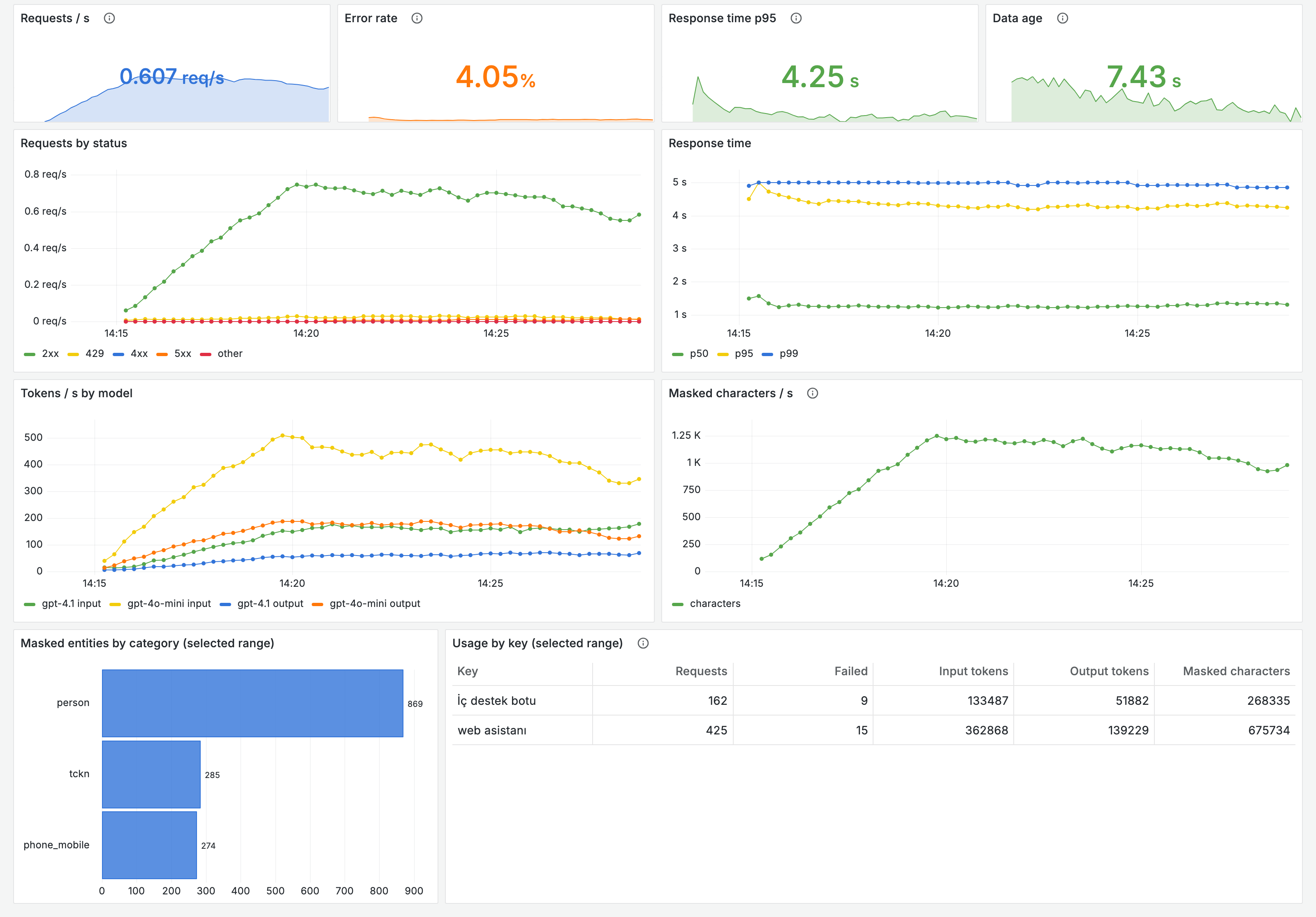
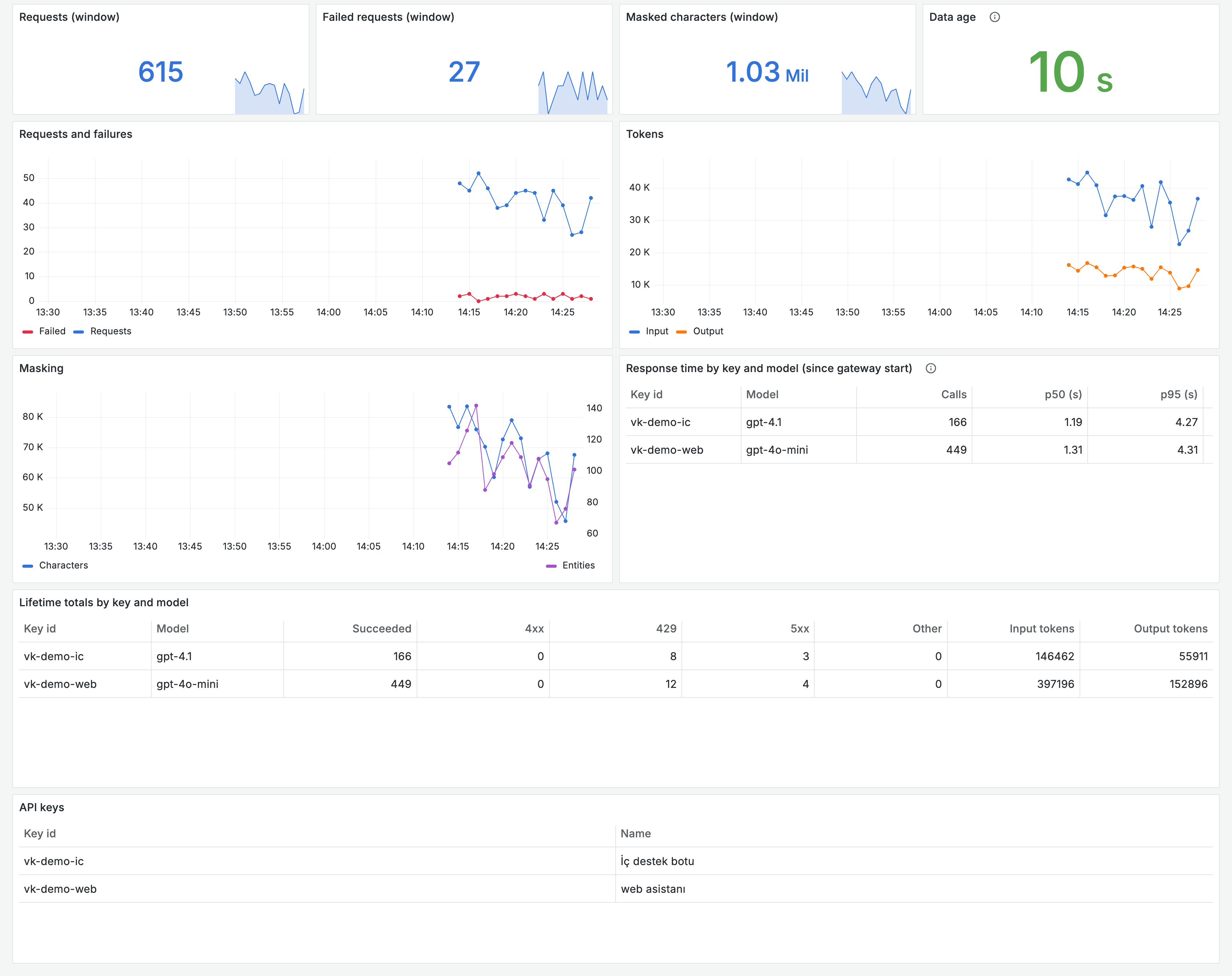
Import the dashboards in Grafana with Dashboards > New > Import and pick your data source.
- Prometheus dashboard (JSON): request rate, error rate, p95, data age, status and model breakdowns, a per-key table.
- Infinity dashboard (JSON):
the same summary from
/api/v1/usage. Enter your panel address in the dashboard variable.
Alerts
The alert rules (YAML) hold seven
rules: error rate above 5%, model provider busy (429_provider), a key hitting
its own limit (429_key_limit, info level), p95 above 10 seconds, data older
than 5 minutes, metrics endpoint unreachable, availability probe failing. The
error rate does not count requests stopped by a key’s own limit. The
thresholds are starting points; tune them to your traffic.
Availability without traffic
Counters only move when there is traffic. To see that the service is up even without traffic, set up two probes with blackbox_exporter (example settings, scrape settings):
- The
/healthendpoint of the API address. No key needed. - A small
/maskcall with your own API key. It sends a synthetic test number and fails unless the response comes back masked. Each probe uses about 14 characters of your quota.